
Table of Contents
- Executive Summary
- Quick Definition
- Key Takeaways
- Introduction
- Why This Case Matters
- Microsoft Telemetry Exposed the Operator
- What Is GDID?
- How Windows OOBE May Relate to Device Identity
- Microsoft Edge Diagnostic Telemetry and Browsing Activity
- Why This Matters for Threat Intelligence and Digital Forensics
- Defensive and Governance Takeaways
- What Researchers Should Investigate Next
- FAQ
- Conclusion
Executive Summary
The arrest and extradition of an alleged Scattered Spider member drew attention for more than the charges themselves. The most revealing detail appeared inside the court documents: Microsoft telemetry associated with a Global Device Identifier, or GDID, helped investigators connect online activity to a specific Windows installation.
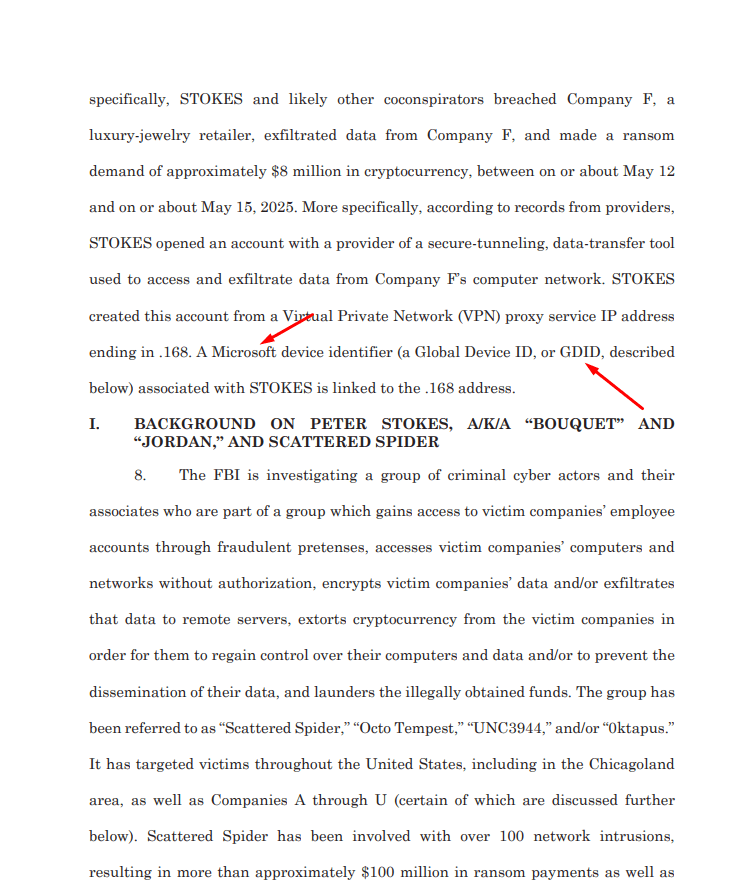
According to the complaint, Microsoft records linked the same GDID to ngrok activity, public IP addresses, timestamps, and browsing activity. This gave investigators a device-level correlation point that remained useful even when VPNs, proxy infrastructure, and anonymization techniques were involved.
This case matters because it shows how endpoint telemetry can support cybercrime attribution. It also highlights an under-discussed Windows identifier that many researchers and threat actors may not fully understand.
Quick Definition
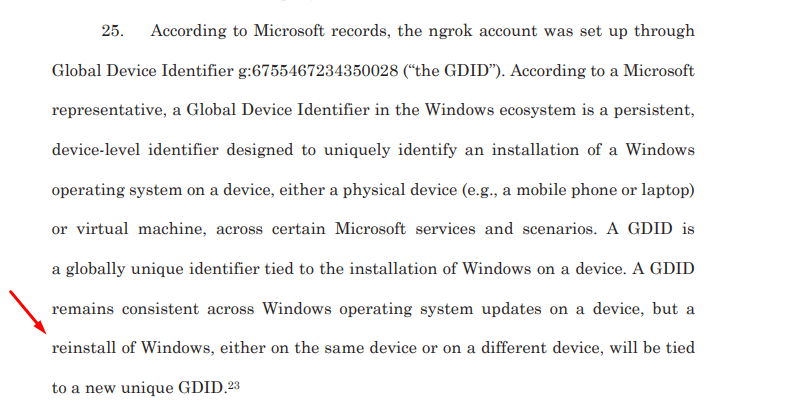
GDID, or Global Device Identifier, is a persistent Microsoft device-level identifier associated with a Windows installation. According to court documents, it can uniquely identify a Windows installation across certain Microsoft services and scenarios, remains consistent across Windows updates, and changes after a Windows reinstall.
Key Takeaways
- The case involves an alleged Scattered Spider member extradited from Finland to the United States.
- Microsoft telemetry associated with a GDID helped investigators correlate activity to a Windows installation.
- The GDID observed in the complaint was
g:6755467234350028. - The telemetry was linked to ngrok activity, public IP addresses, timestamps, and browsing activity.
- GDID appears to be tied to a Windows installation rather than permanently bound to hardware.
- A Windows reinstall can generate a new GDID.
- The case shows how Microsoft telemetry can support cybercrime attribution when combined with other investigative evidence.
- For defenders and researchers, GDID is an important but under-discussed forensic signal.
Introduction
On July 1, 2026, the U.S. Department of Justice announced the extradition of an alleged Scattered Spider member from Finland to the United States, marking another significant milestone in the ongoing international effort to dismantle one of the most prolific cybercriminal groups operating today. The suspect, 19-year-old Peter Stokes, faces charges of conspiracy, computer intrusion, and fraud for his alleged role in a series of attacks that have collectively resulted in more than 100 network intrusions and over $100 million in ransom payments.

Peter Stokes, a 19-year-old Estonian-US dual citizen known by the online alias “Bouquet”, was apprehended at Helsinki Airport in Finland while attempting to board a flight to Japan.

At first glance, this appears to be just another cybercriminal arrest. Law enforcement agencies announce the arrest of threat actors on a regular basis, and such cases have become increasingly common. However, this case stands out for a very different reason.
The biggest surprise isn’t the arrest itself, It’s what appears on page 8 of the indictment. For security researchers and threat actors alike, this section is arguably the most revealing part of the document. What it uncovers goes well beyond a typical OPSEC mistake, offering rare insight into the inner workings of the operation and how investigators ultimately connected the dots.
Why This Case Matters
Cybercriminal attribution often depends on mistakes: reused infrastructure, exposed accounts, weak OPSEC, leaked identities, or overlapping IP activity.
This case shows a different type of attribution path.
Instead of relying only on a visible OPSEC failure, investigators used telemetry associated with a Windows installation. The GDID became a device-level correlation point that helped connect different activities back to the same environment.
That makes this case important for three audiences:
Threat Intelligence Researchers
The case provides a public example of how device telemetry can support attribution when combined with account records, infrastructure logs, and timestamps.
Digital Forensics Teams
The GDID shows how persistent device identifiers may become relevant in investigations involving Windows systems and Microsoft services.
Threat Actors
The case demonstrates that VPNs and anonymization tools may not fully break attribution if the same operating system installation continues generating identifiable telemetry.
Microsoft Telemetry Exposed the Operator
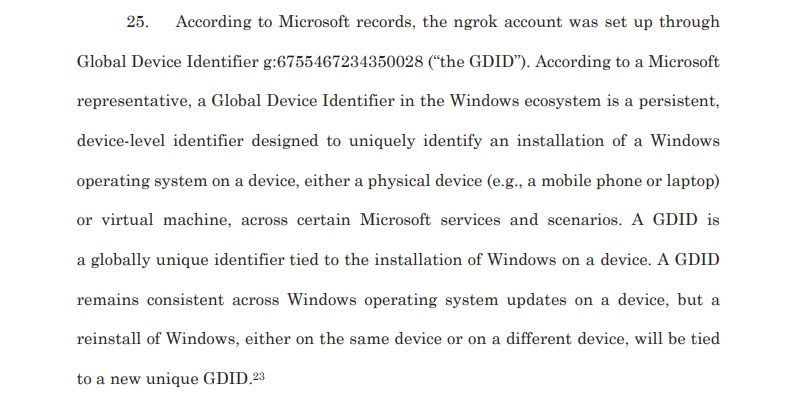
According to the court documents, Microsoft provided telemetry associated with the suspect’s Global Device Identifier (GDID) to the FBI.
The GDID is a unique identifier assigned to a Windows installation.
The identifier remains consistent unless the operating system is reinstalled or wiped.
Microsoft telemetry linked the same GDID across multiple activities.
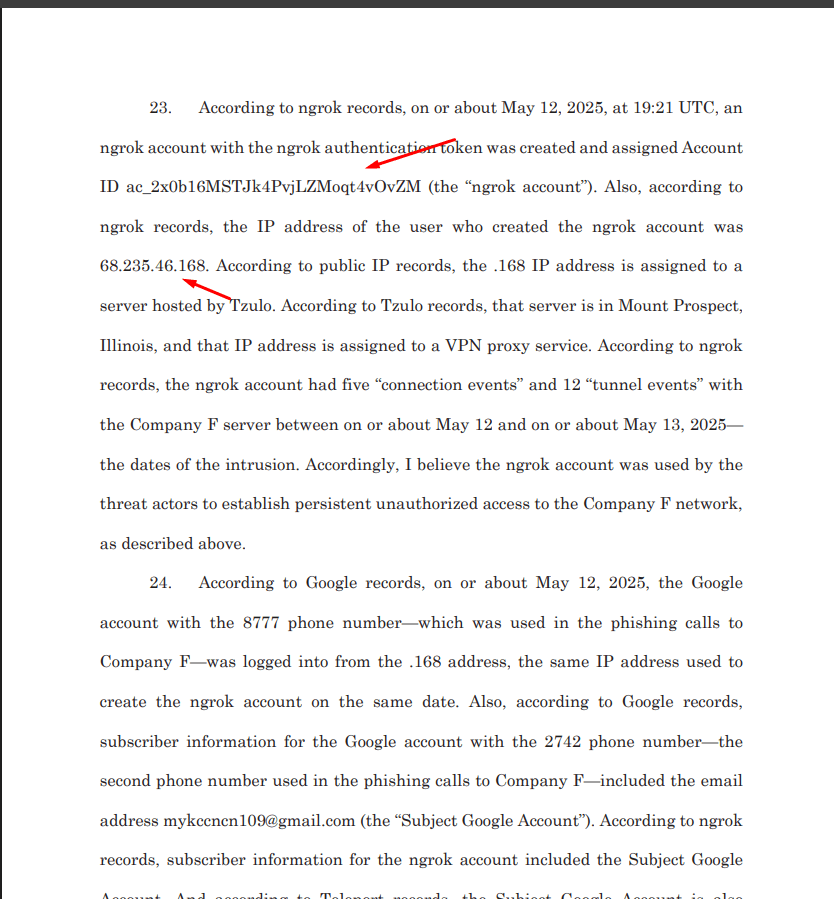
The telemetry included the device’s public IP addresses.
The telemetry recorded timestamps of internet activity.
The telemetry showed web browsing activity.
The telemetry identified the use of ngrok from the same device.
The telemetry correlated the device with infrastructure used during the intrusion.
This evidence allowed investigators to tie activity back to a single Windows installation despite the use of VPNs and other anonymization techniques.
According to the court documents, Microsoft provided Windows telemetry associated with the suspect’s Global Device Identifier (GDID) to the FBI.
GDID observed in the investigation: g:6755467234350028.
However, this Microsoft identifier is largely unknown to many security researchers and threat actors alike. The court documents also suggest that the full extent of the telemetry associated with the Global Device Identifier (GDID)
What Is GDID?
GDID stands for Global Device Identifier. In the court documents, Microsoft describes it as a persistent identifier tied to a Windows installation.
In practical terms, GDID can be understood as a device-level identity signal used across certain Microsoft services and telemetry scenarios. It is not simply an IP address, browser cookie, or hardware serial number.
The important point is persistence. If the same Windows installation continues to be used, the GDID can remain stable across operating system updates. However, if Windows is reinstalled, the GDID can change.
GDID vs. Other Identifiers
| Identifier | What It Usually Represents |
| IP address | Network location or proxy/VPN endpoint |
| Cookie | Browser or website session identity |
| Hardware serial | Physical device component |
| GDID | Windows installation-level identifier |
| Microsoft account | User identity across Microsoft services |
How Windows OOBE May Relate to Device Identity
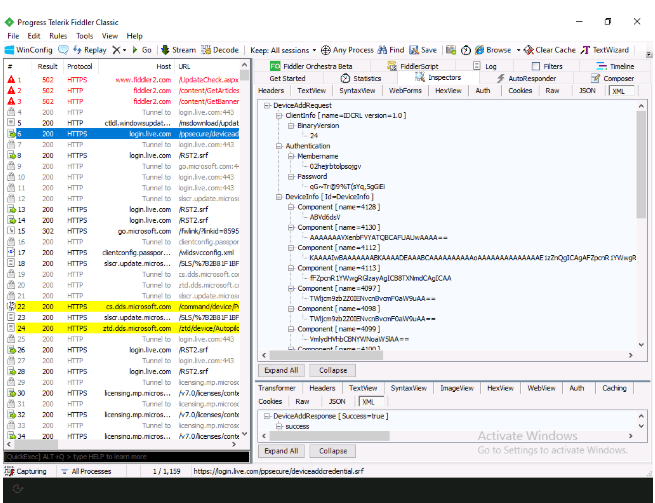
The author revisited network traffic generated during the Windows Out-of-Box Experience (OOBE) using Fiddler to understand how Windows Autopilot identifies a device. Windows 11 was unsuitable for this analysis because OOBE components run under the defaultUser0 account instead of Administrator, preventing Fiddler from capturing all UWP application traffic. Therefore, Windows 10 was used instead.
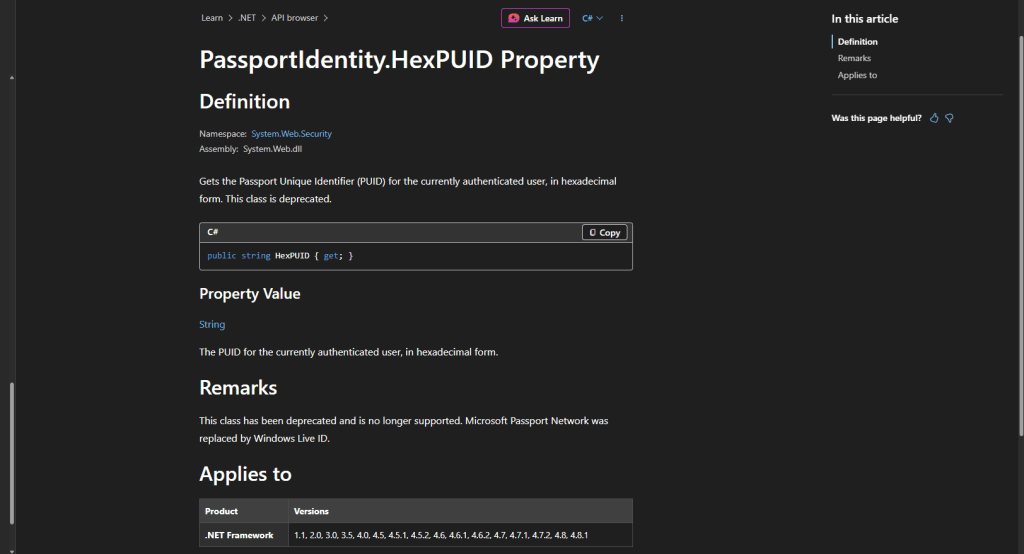
While previous analysis revealed how Autopilot profiles are delivered to a device, it did not explain how Microsoft associates an uploaded Autopilot hardware hash with a specific device. Network captures showed that, before requesting an Autopilot profile, the device first registers itself with Microsoft’s legacy Passport.NET service by sending a request to https://login.live.com/ppsecure/deviceaddcredential.srf. During this registration, the device generates and submits a unique membername, password, and additional device information, indicating that device identification relies on more than just the uploaded hardware hash.
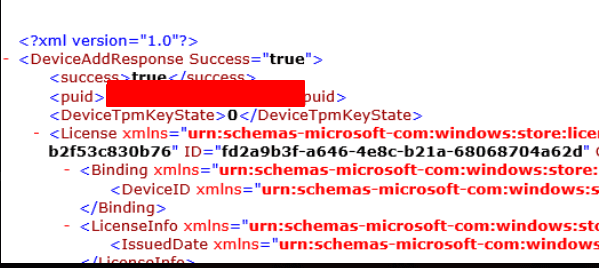
According to the court report, reinstalling the Windows operating system can result in the generation of a new GDID (Passport Unique ID/PUID), indicating that the identifier is tied to the operating system’s device registration process rather than being permanently bound to the underlying hardware.
Microsoft Edge Diagnostic Telemetry and Browsing Activity
The court reporting also raises questions about browsing activity linked to the GDID.
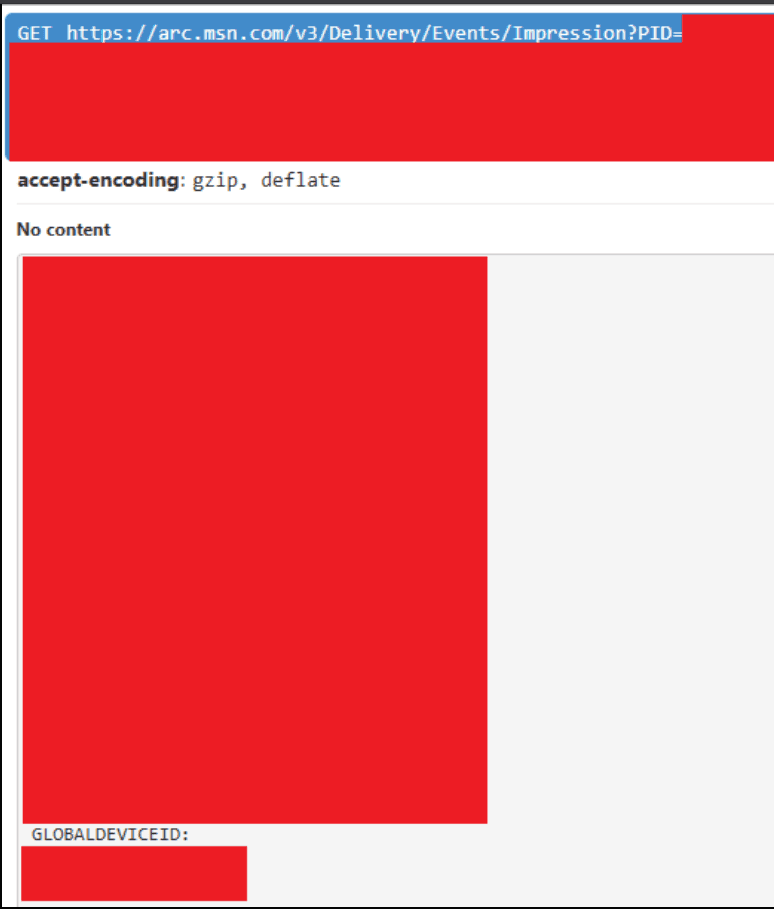
One plausible source is Microsoft Edge diagnostic telemetry. Microsoft’s own policy documentation states that optional diagnostic data can include URLs of pages visited and per-page usage data when URL diagnostic reporting is enabled.
This does not mean every Edge installation sends the same level of browsing data in every environment. Diagnostic data depends on settings, policies, user choices, and enterprise configuration.
However, the case shows why browser telemetry matters in investigations. If web activity can be associated with a persistent device identifier, it may help connect account creation, infrastructure access, and other online behavior to the same endpoint.

Why This Matters for Threat Intelligence and Digital Forensics
This case matters for defenders because it shows how telemetry can support attribution, incident reconstruction, and infrastructure correlation.
For threat intelligence teams, GDID highlights the importance of device-level identifiers in modern investigations. Threat actors may rotate infrastructure, accounts, VPNs, and aliases, but persistent identifiers can still create continuity across activity.
For digital forensics teams, the case reinforces a broader lesson: endpoint telemetry, cloud records, browser diagnostics, and account activity should be analyzed together. The value is not in one log source. The value is in how multiple sources connect.
For enterprise security leaders, the case also raises governance questions around telemetry, privacy, retention, legal access, and diagnostic data configuration.
Defensive and Governance Takeaways
This case is not only relevant to law enforcement. It is also relevant to enterprise security and privacy governance.
Organizations should consider the following:
- Review Windows and Microsoft Edge diagnostic data policies.
- Understand what telemetry is enabled across managed endpoints.
- Document how diagnostic data settings are configured in enterprise environments.
- Align telemetry collection with legal, compliance, and privacy requirements.
- Preserve endpoint and identity logs during incident response.
- Correlate device, browser, identity, and network activity during investigations.
- Strengthen help desk identity verification to reduce social engineering risk.
- Use phishing-resistant MFA for high-risk and privileged accounts.
The main lesson is not that telemetry alone solves attribution. The lesson is that telemetry becomes valuable when combined with identity records, infrastructure logs, and investigative context.
What Researchers Should Investigate Next
The court documents make GDID publicly visible, but many technical details remain under-documented.
Researchers should investigate:
- where GDID is stored locally
- how it is generated
- which services receive it
- how it relates to Passport Unique ID or device PUID
- how it changes after reinstall
- whether enterprise policies reduce or prevent certain telemetry associations
- how Microsoft Edge diagnostic telemetry references device identifiers
- which forensic artifacts remain available locally
This is an important area for digital forensics, privacy research, and threat intelligence.
FAQ
What is GDID?
GDID stands for Global Device Identifier. According to court documents, it is a persistent Microsoft identifier tied to a Windows installation across certain services and scenarios.
Is GDID the same as PUID?
Public technical analysis suggests GDID is related to Microsoft Passport or device PUID systems. However, the court document itself defines GDID as a persistent Windows installation identifier, so the relationship should be described carefully.
Does GDID survive a Windows reinstall?
According to the court document, GDID remains consistent across Windows updates, but a reinstall of Windows creates a new unique GDID.
How was GDID used in this case?
Microsoft records associated the GDID with ngrok activity, IP addresses, timestamps, and browsing activity. Investigators used that information alongside other records to support attribution.
Does using a VPN hide GDID?
No. A VPN may hide a direct residential IP address, but it does not remove device-level telemetry generated by the operating system or Microsoft services.
Does Microsoft Edge collect browsing diagnostic data?
Microsoft Edge documentation states that optional diagnostic data may include information about browser usage and websites visited, depending on configuration and policy.
Why does this matter for defenders?
It shows that Windows telemetry and device identifiers can be valuable forensic artifacts during cybercrime investigations.
Conclusion
For years, many cybercriminal arrests have been explained through OPSEC mistakes, reused infrastructure, leaked identities, or exposed accounts. This case adds another important layer: Windows telemetry.
The court documents show that Microsoft telemetry associated with a GDID helped investigators connect activity to a specific Windows installation. That identifier, combined with IP records, ngrok activity, timestamps, account records, and other evidence, became part of the attribution chain.
The case also brings attention to a Microsoft identifier that has received limited public discussion. GDID, also associated by researchers with Microsoft’s Passport/device identity ecosystem, may play an important role in telemetry, authentication, and digital forensic investigations.
The bigger lesson is clear: attribution does not always depend on one mistake. Sometimes, it comes from the quiet persistence of device-level telemetry across services, sessions, and infrastructure.